AI product photography has improved quickly. Most tools can now take a basic product image and generate something polished within seconds. A handbag can be moved into a studio or cafe setting, furniture can be placed into a room, and lifestyle scenes can be created without organizing a traditional photo shoot.
For ecommerce teams, though, the real test is not whether one generated image looks impressive. The output needs to be accurate enough to represent the actual product and consistent enough to sit alongside hundreds of other images in the same catalog.
Small differences start to matter at that point. A background color that changes from image to image creates inconsistency. An armchair that is slightly too large for the room looks unrealistic. A bag that changes shape, hardware or texture is no longer an accurate product image. And if someone has to rewrite prompts or manually reposition every SKU, the workflow becomes difficult to scale.
We therefore tested four AI product photography tools: Crop.photo, Claid, Canva and PhotoRoom, using the same ecommerce photos rather than comparing their marketing claims or feature lists.
How We Tested the AI Product Photography Tools
We used the same 4 product photography tasks across Crop.photo, Claid, Canva and PhotoRoom. The idea was to remove as much subjectivity as possible. Each platform started with the same source product image and was asked to create the same kind of final image.
The four tests covered different levels of difficulty:
- Handbag studio product photography: Turn a plain handbag image into a clean beige studio shot with a natural shadow.
- Handbag Lifestyle scene generation: Place the same handbag naturally into a cafe environment.
- Furniture placement: Add an armchair into an existing room while preserving realistic scale, perspective and lighting.
- Complex lifestyle scene: Place a lamp into a living-room environment with a person, while keeping the model faceless.
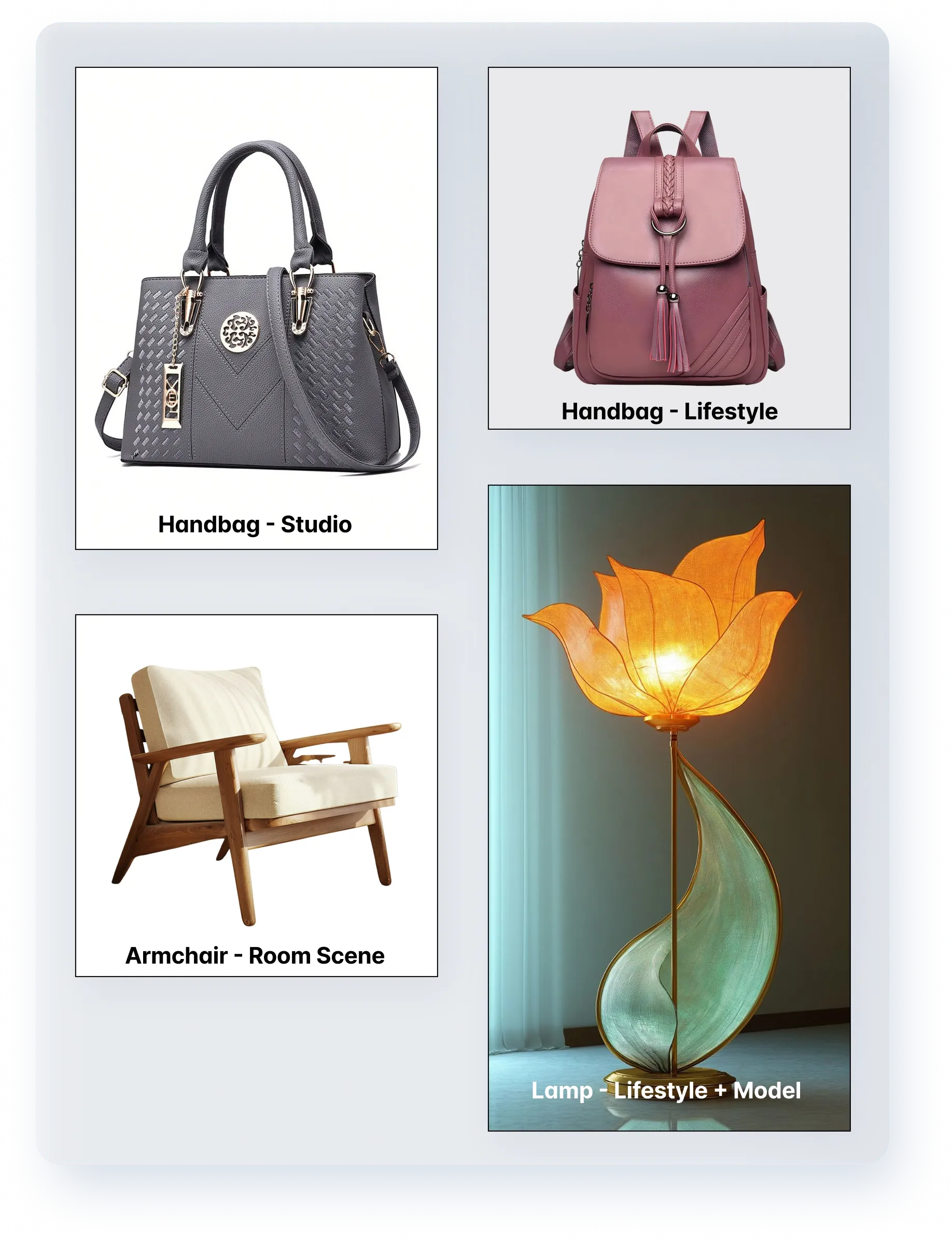
The same source images were used across all four AI product photography platforms.
We looked at more than whether the final image was attractive. For ecommerce production, we cared about product fidelity, scene accuracy, lighting, realistic scale, composition and repeatability.
We also looked at how practical the workflow would be if the job involved hundreds of SKUs rather than one image.
AI Product Photography Results at a Glance
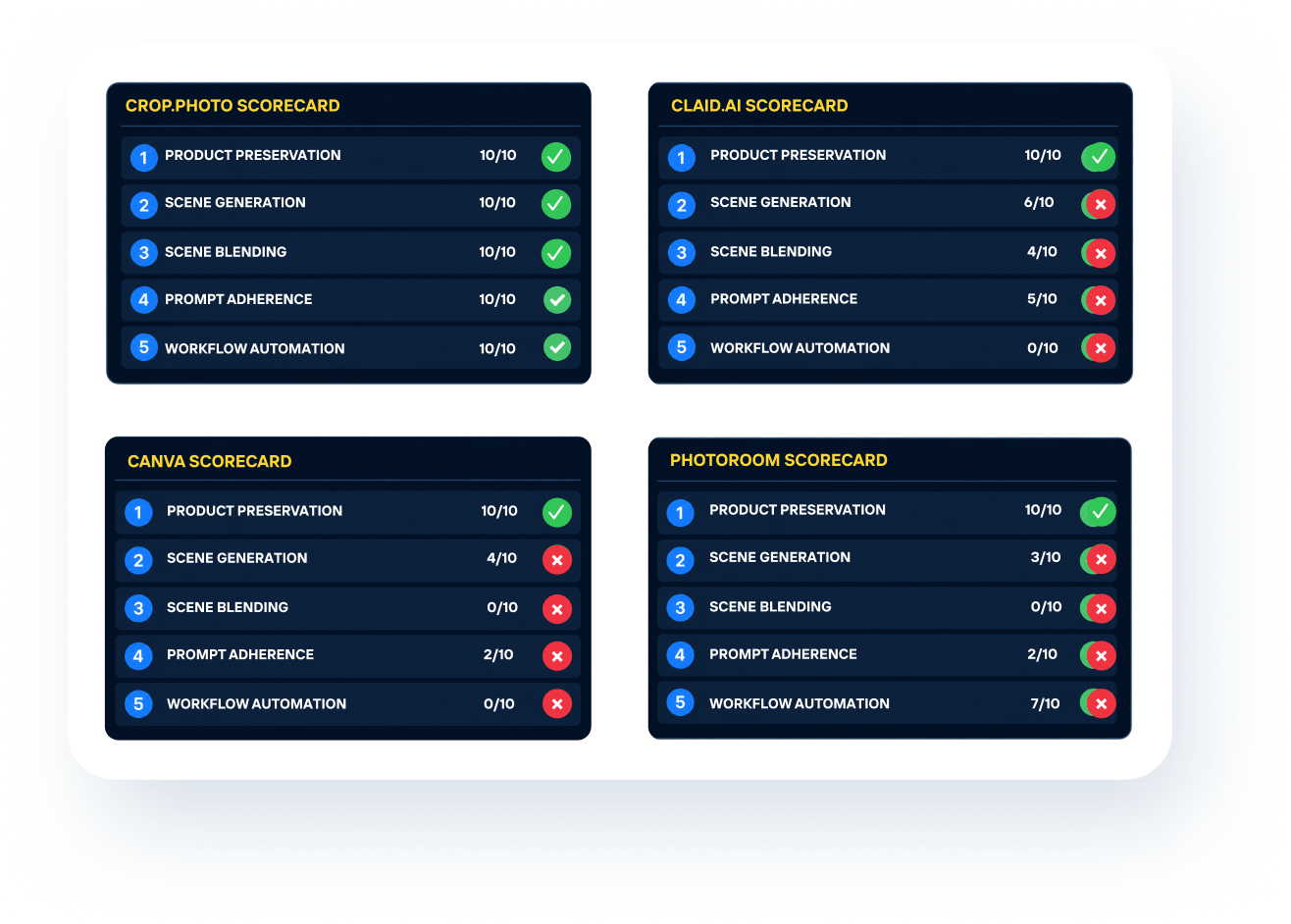
The scorecards gave us a clear spread.
1. Crop.photo
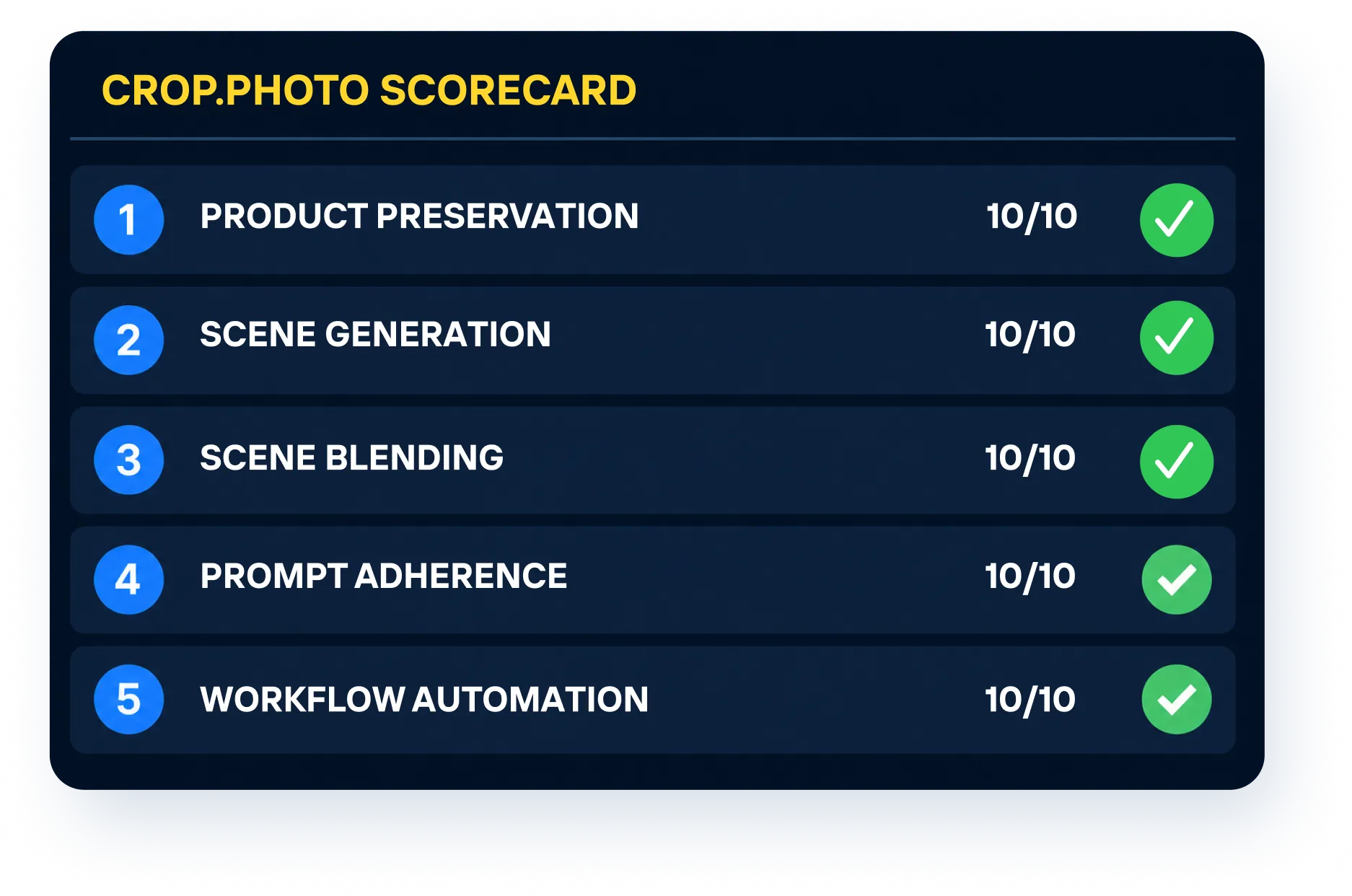
Crop.photo was the only platform in our test to achieve the full 50 out of 50 score.
The important distinction was not simply image quality. Crop.photo is designed around repeatable ecommerce workflows, so the same production rules can be reused rather than recreated for every product.
That becomes useful very quickly when the requirement is specific. A retailer may need a certain background treatment, a predictable product scale, consistent margins or a particular lifestyle setup. Once that direction has been approved, the goal should be to reproduce it across the catalog rather than continually experiment with new prompts.
Handbag Studio Background Test
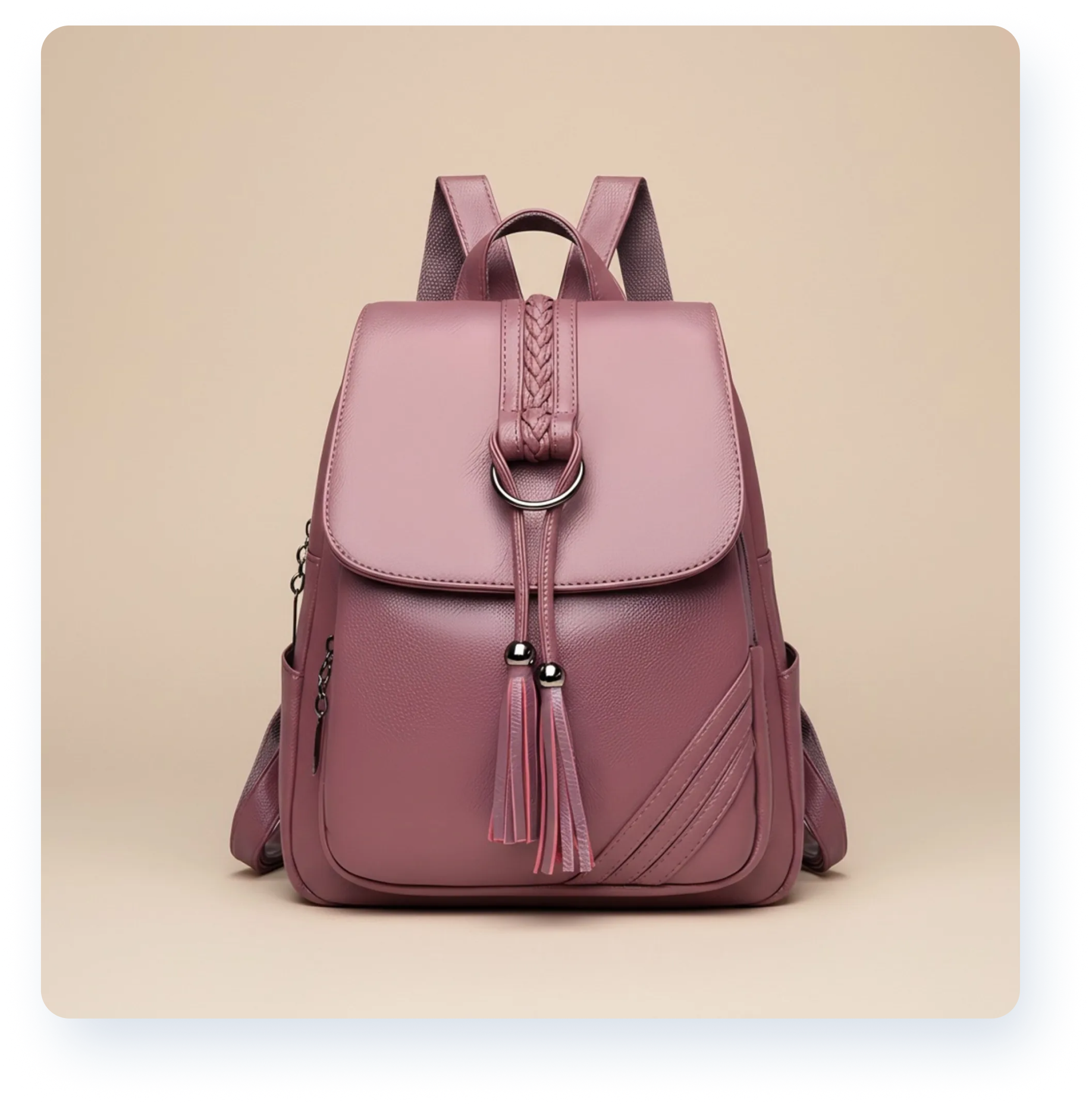
Crop.photo generated the uniform beige background and natural shadow we were after, while keeping the handbag margins consistent. It was the only tool that allowed us to control the margins around the primary object.
The bigger advantage was that the setup did not have to remain a one-off edit. The same background treatment could be saved as a reusable studio shadow recipe for bags and applied consistently to other product images.
For ecommerce teams, that means the background, margins, and output size can become part of the production workflow instead of being recreated manually for each SKU.
Handbag Lifestyle Scene Test
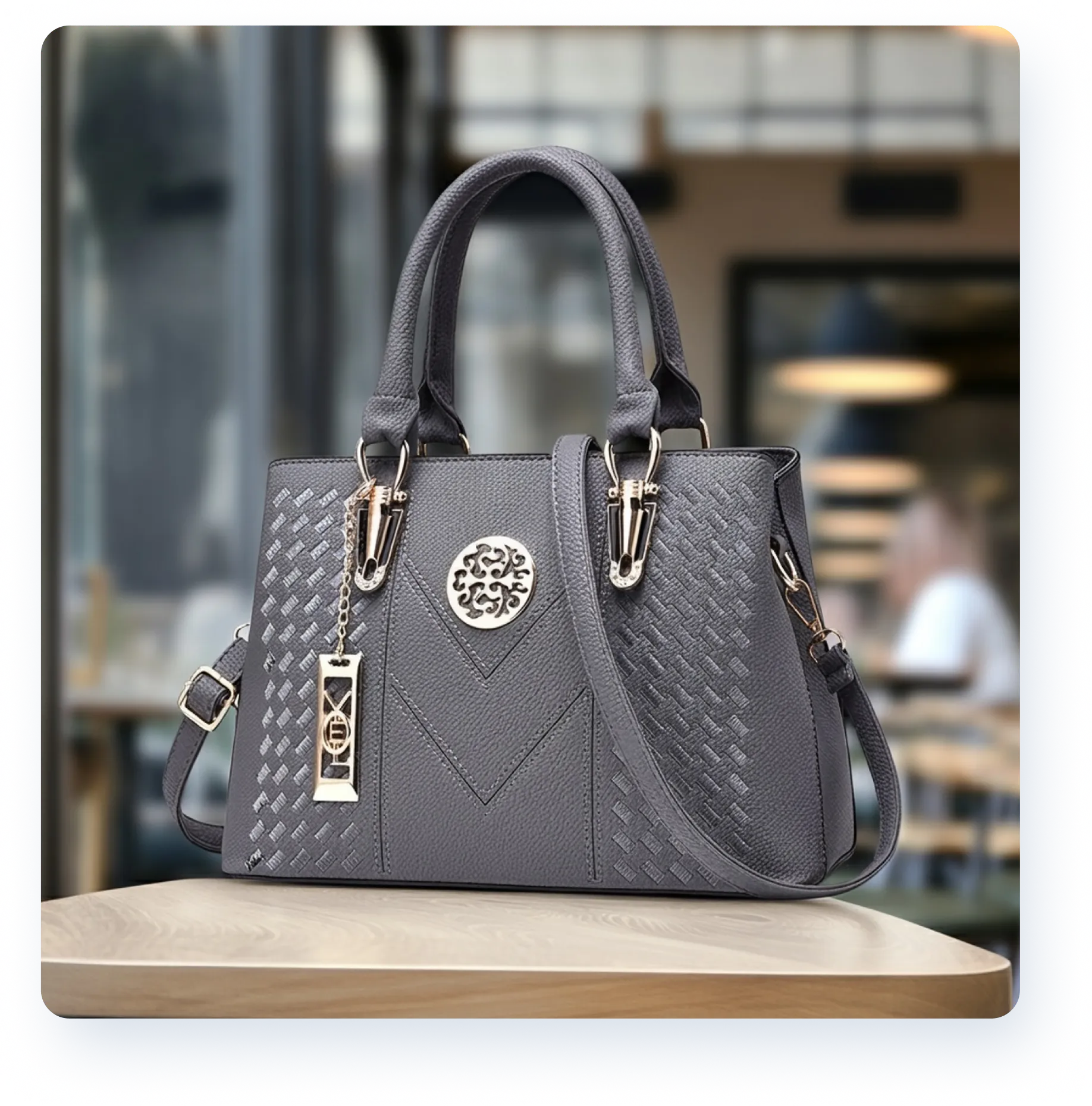
Crop.photo generated the requested cafe lifestyle scene with the bag placed naturally in the environment.
The important part was that the same everyday lifestyle scene recipe could then be reused with other bag images rather than starting again with a fresh prompt.
That makes the workflow much more practical for a brand that needs a consistent lifestyle look across a larger product set.
Armchair Room Placement Test
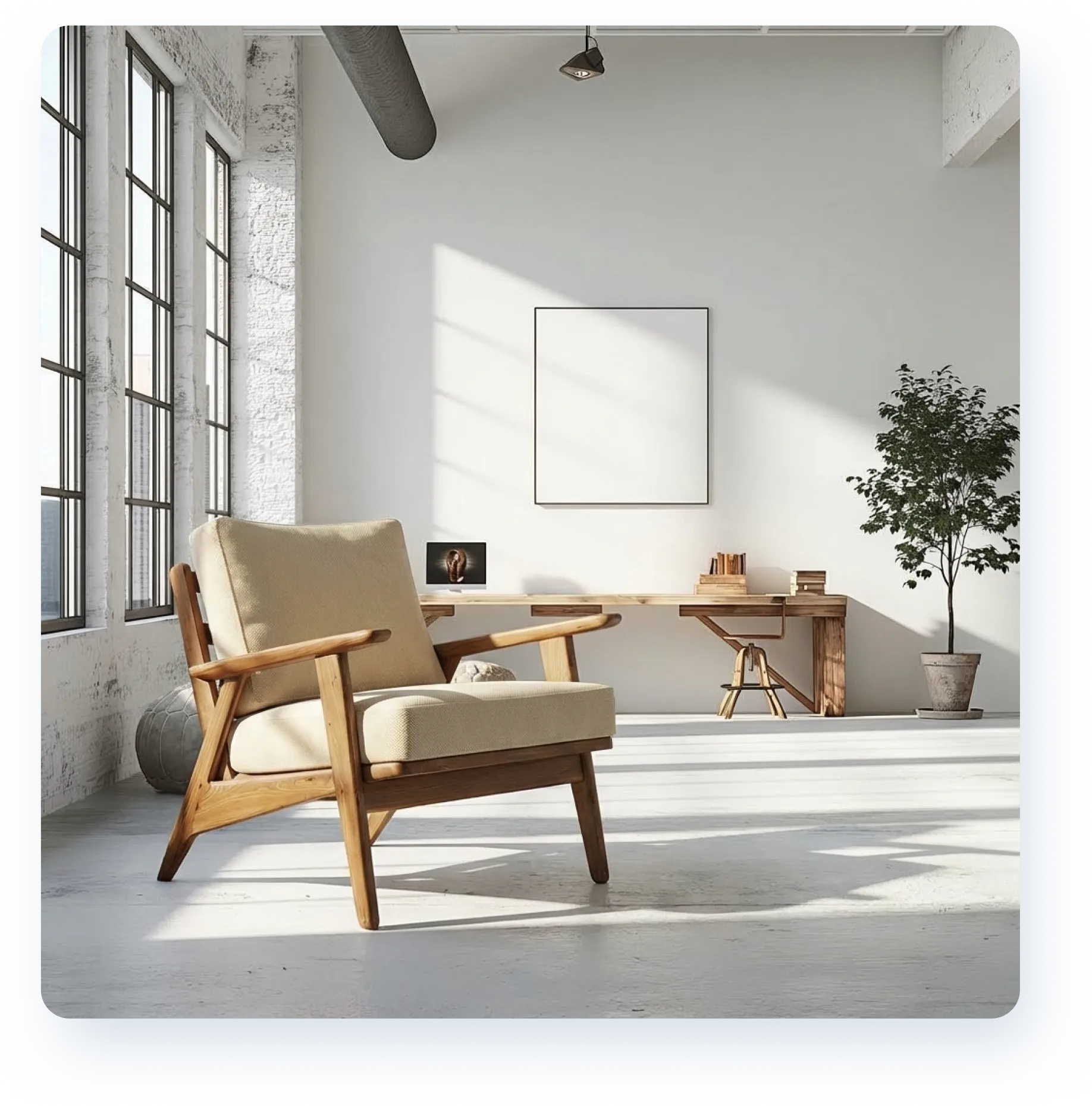
Crop.photo handled the supplied-room test by placing the armchair into the existing room scene at the correct proportion, which is what the furniture room placement recipe is built for.
For furniture and home-goods teams, this is important because the value is not just producing one convincing placement. It is being able to repeat the same room treatment across different products without rebuilding the workflow.
Lamp Lifestyle Scene with Model Test
Crop.photo generated the lamp inside the requested home decor lifestyle room scene at the correct scale, including the faceless model.
The same recipe could also be applied to another input image, where a faceless person was again added to the scene.
For ecommerce teams, that combination of product scale, prompt adherence and repeatability is what makes the result more useful than a one-off lifestyle generation.

What stood out
Across the four tests, Crop.photo produced the expected output while keeping the workflow centered around the ecommerce product.
The larger advantage is what happens after the first successful image. The same setup can become a reusable recipe rather than remaining a one-off generation.
For a catalog team, that changes the operating model from:
prompt → generate → adjust → repeat
to:
save the approved settings → reuse the AI recipe → process more products
That distinction matters more as volume increases.
Best for
Ecommerce teams, studios and brands that need consistent AI product photography across multiple SKUs rather than one-off generated images.
2. Claid AI
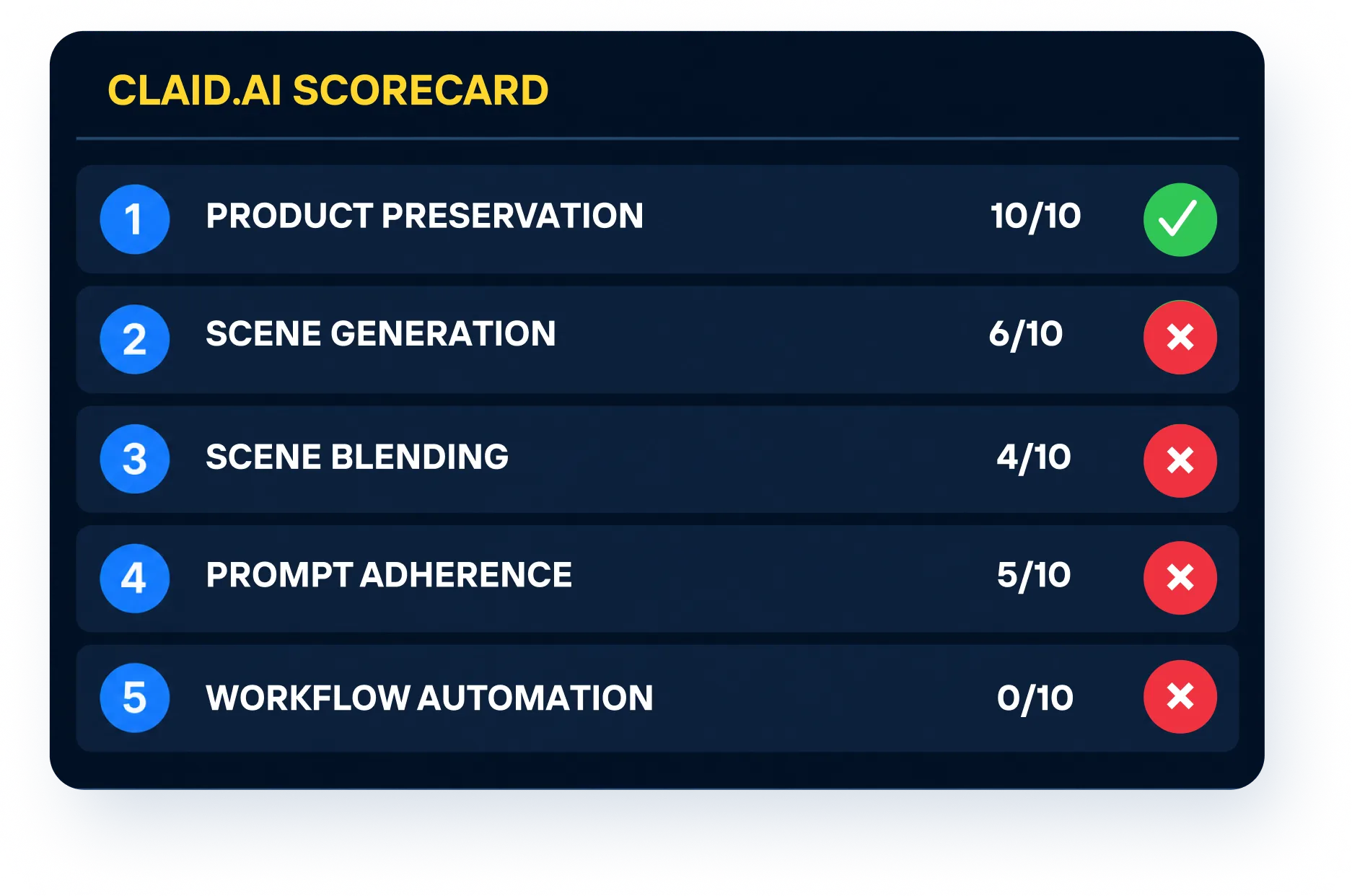
Claid finished second in our test with 25 out of 50.
The workflow is straightforward and capable of producing convincing individual product images, but our tests exposed some limitations once we asked for more precise ecommerce control.
Handbag Studio Background Test
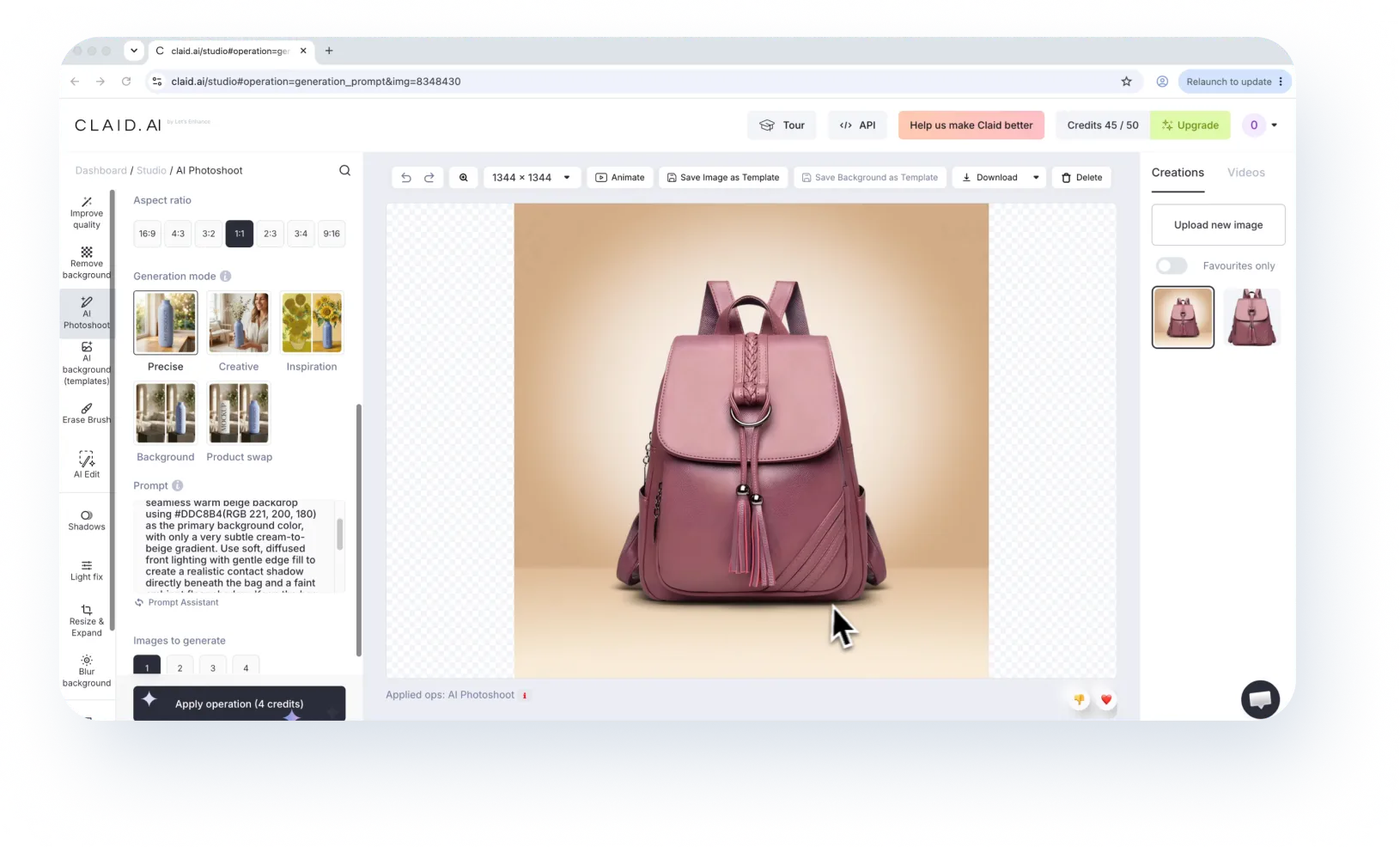
For the handbag studio image, Claid preserved the product reasonably well, although there was a slight change in the appearance of the bag.
The bigger issue was the background. We were aiming for a controlled beige studio treatment, but the generated environment contained more lighting variation and did not closely match the background we specified.
For a single campaign image, that may be acceptable. For a product grid where background consistency matters, the difference becomes more noticeable.
Handbag Lifestyle Scene Test
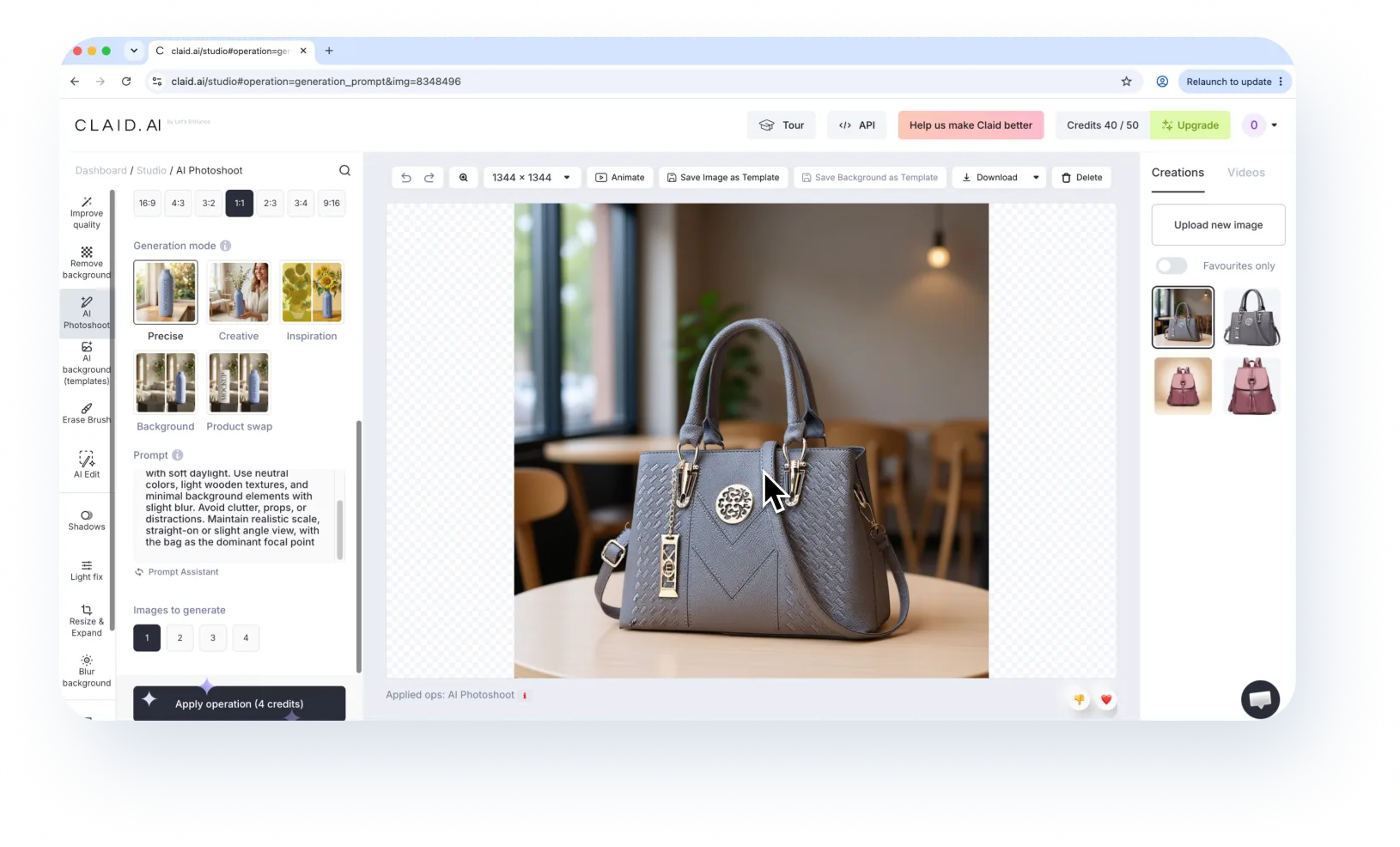
The cafe result was usable and the handbag remained unchanged. The main limitation was that the scene did not closely match the intended composition as we wanted.
This is a common issue with prompt-led generation: the tool may understand the idea of the scene without reproducing the exact scene treatment.
Armchair Room Placement Test
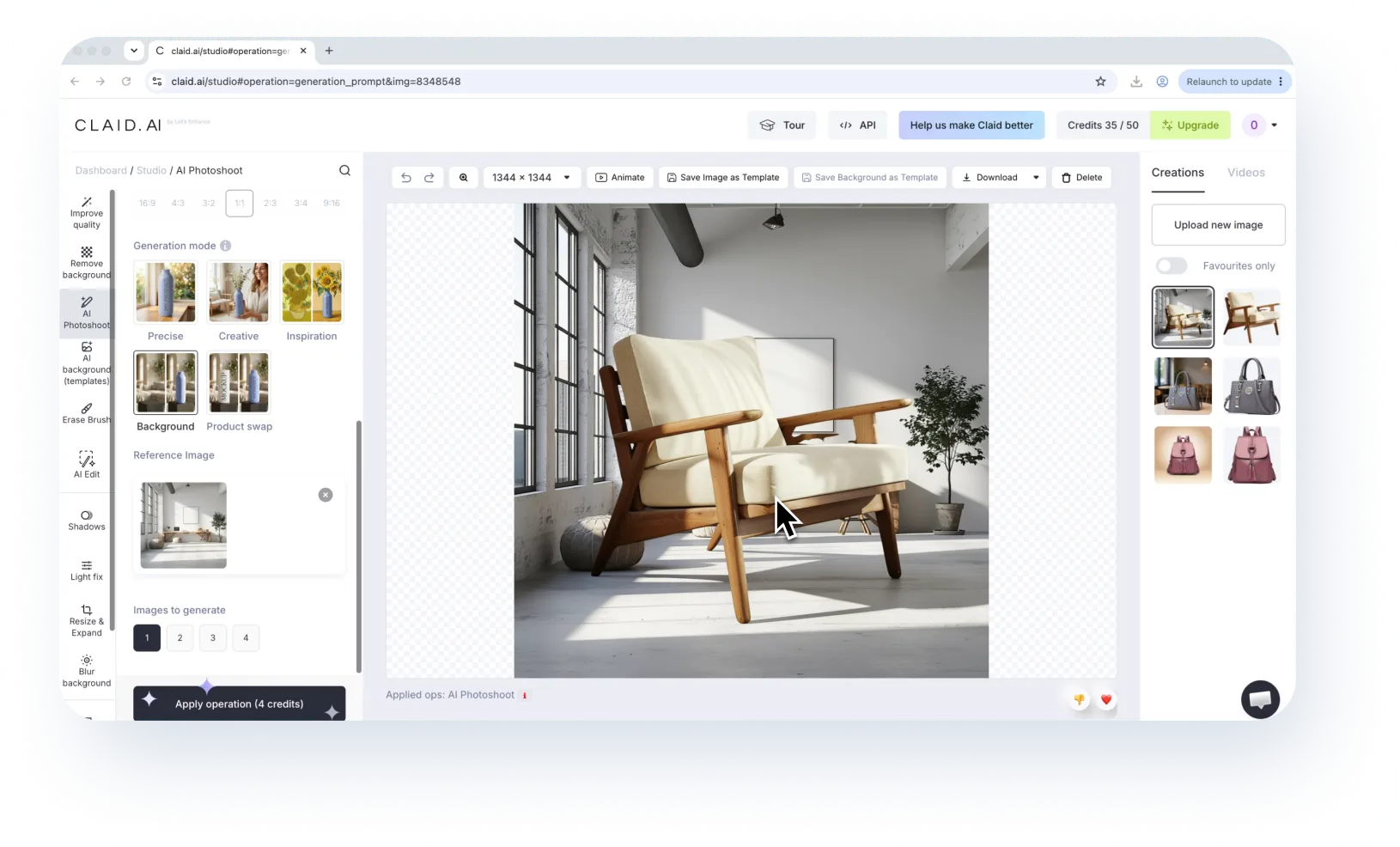
This test exposed the biggest problem.
The chair was generated at a scale that was much too large relative to the room. The image itself looked polished, but the physical relationship between the furniture and the room was incorrect.
For furniture and home-goods brands, scale is not a cosmetic detail. If the product looks physically implausible in the environment, the image is difficult to use.
Lamp Lifestyle Scene with Model Test
In the lamp test, the lamp proportions were also too large. The result additionally introduced a visible face even though the requirement specified a faceless person.
That kind of deviation may be easy to fix by regenerating an individual image, but repeated regeneration adds work when the same process has to be used across many products.

Best for
Teams that want flexible, prompt-driven product staging and are comfortable iterating on individual images.
3. PhotoRoom
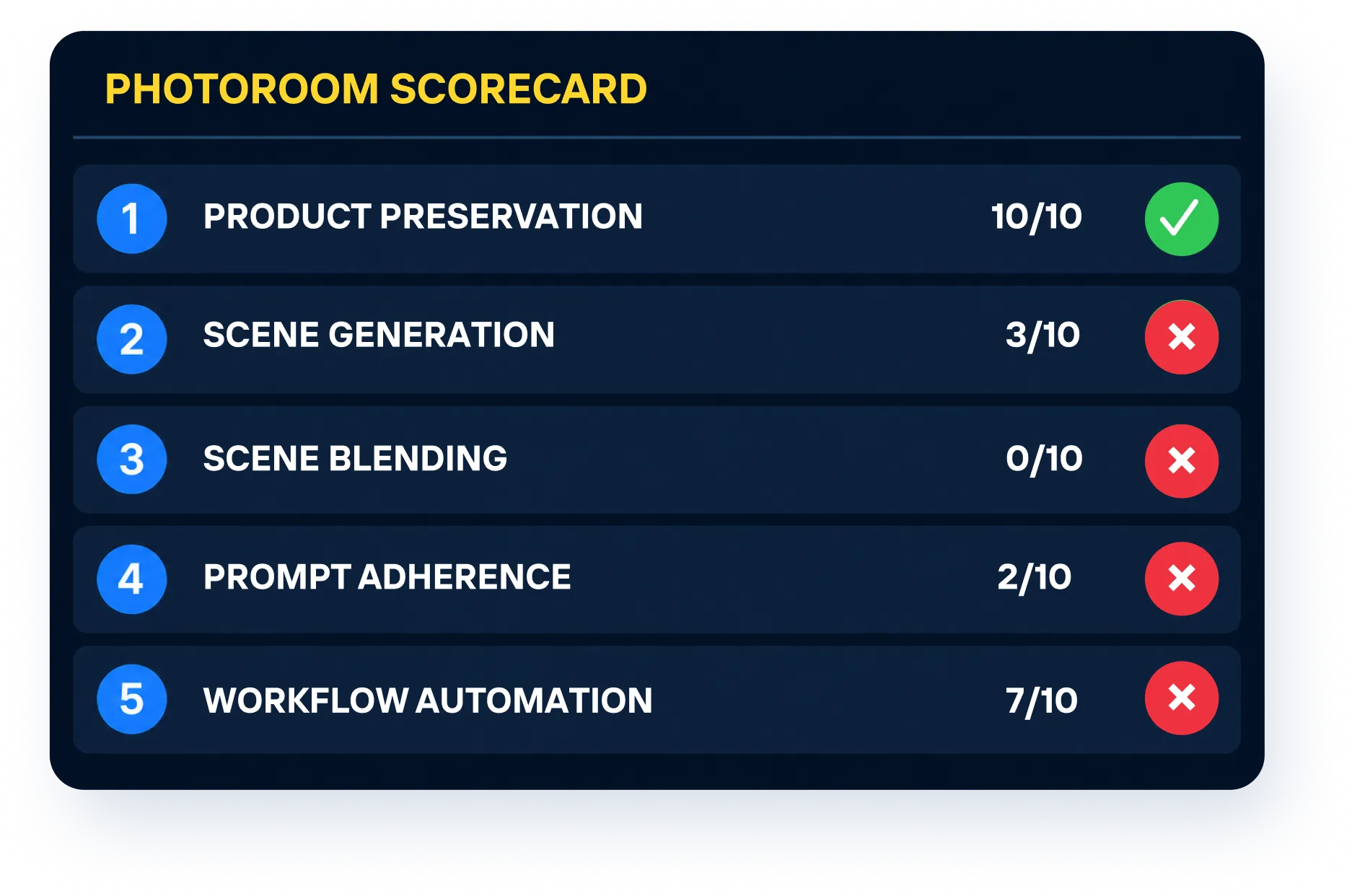
PhotoRoom scored 22 out of 50 in our test.
Its interface is product-focused and relatively easy to work with, which makes it appealing for merchants who want to produce individual product visuals quickly.
The differences became more apparent when we looked for precise control and consistency.
Handbag Studio Background Test
For the handbag test, PhotoRoom created a clean studio-style treatment and generated a believable grounding shadow.
The main issue was the requested background color.
We were trying to create a specific beige color gradient, but the generated background did not closely follow the requested color. The result was attractive on its own, but it was not the controlled treatment we had asked for.
There was also no way in that generation step to enforce the exact product margins we wanted. Those details become more important when images need to sit together in the same ecommerce grid.
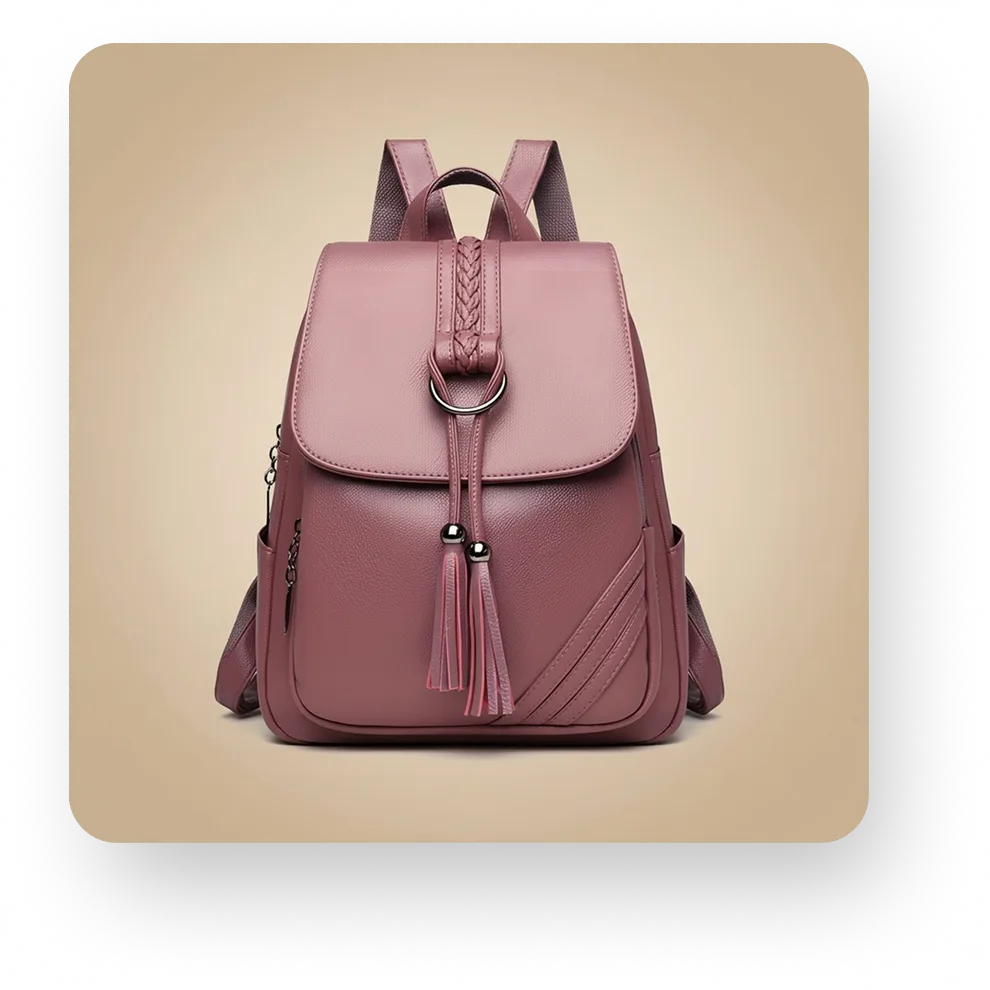
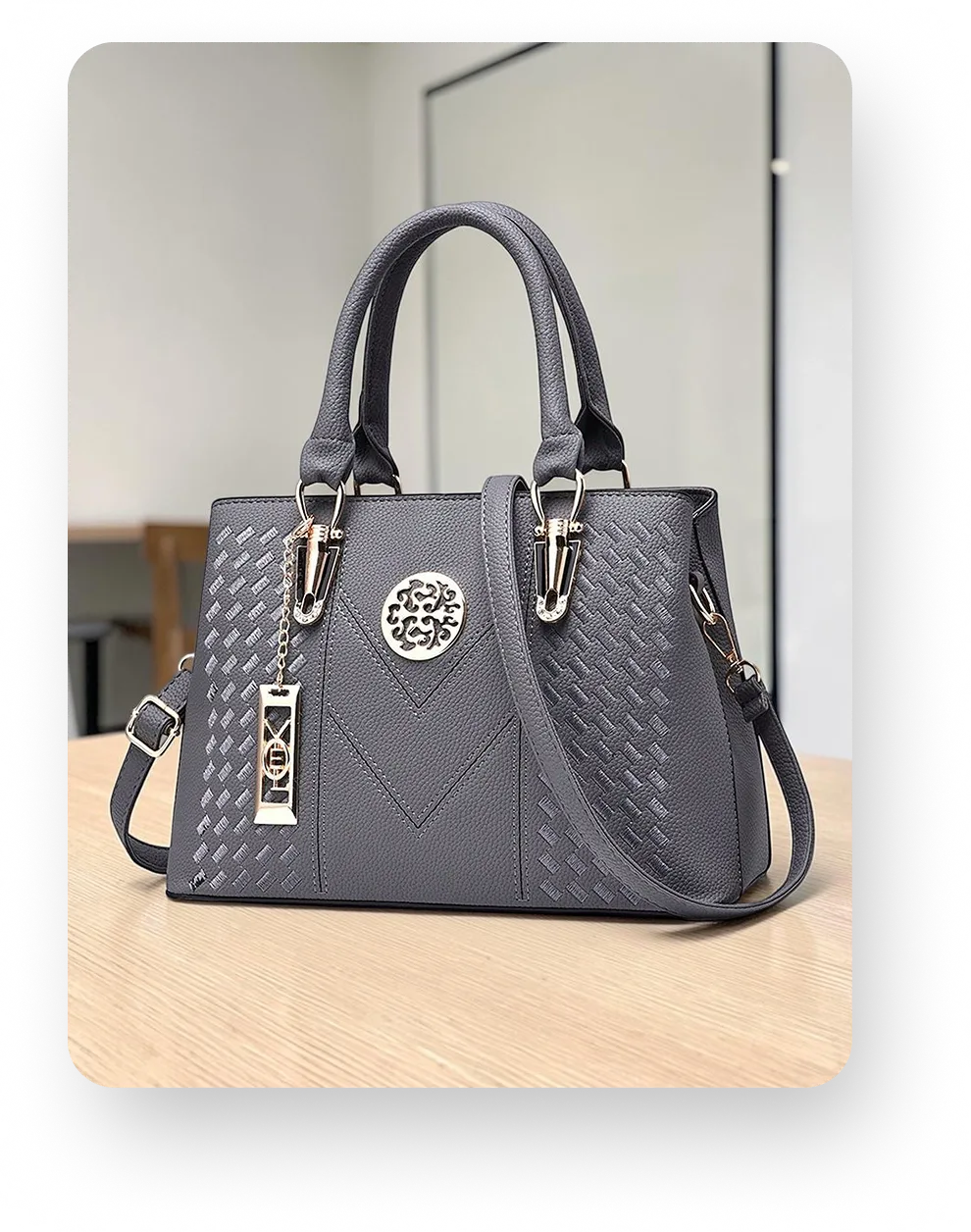
Handbag Lifestyle Scene Test
This test was a clear miss.
We asked for an indoor cafe lifestyle scene, but both generated options looked more like classroom settings. The tool understood that the bag needed a new environment, but it did not follow the scene direction closely enough.
For ecommerce teams, that kind of prompt miss creates extra review and regeneration work. A polished image is not useful if the environment is fundamentally different from the approved creative brief.
Armchair Room Placement Test
PhotoRoom could not complete this test.
We looked through the available AI background and product-staging options, but there was no way to blend the armchair into an existing supplied room image. The tool could generate a new background, but it could not marry the product to the room scene we provided.
For brands, looking at reusing their copyrighted background images for consistency, that is a significant limitation because many workflows start with an approved interior scene and require products to be placed into that exact environment.
Lamp Lifestyle Scene with Model Test
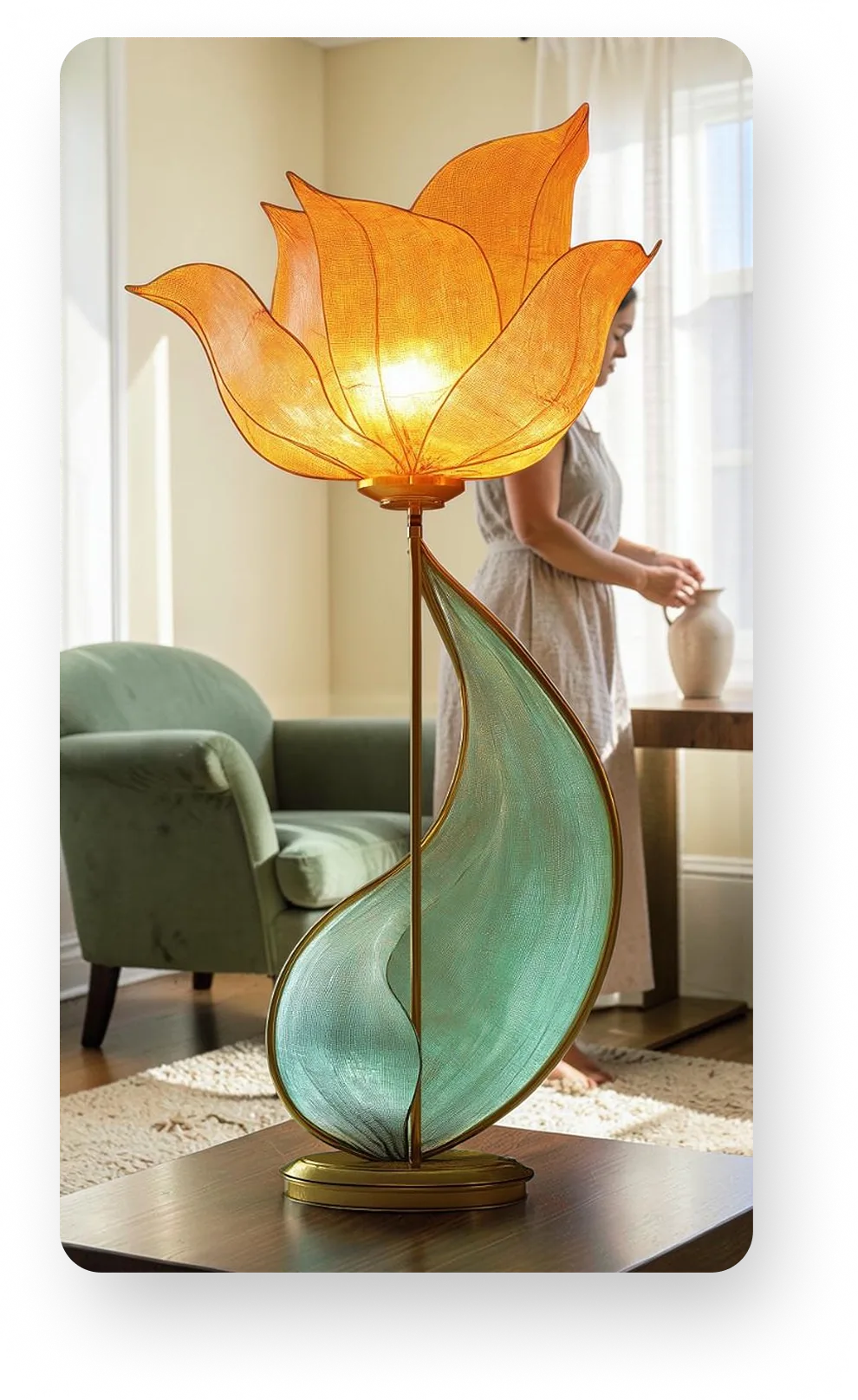
PhotoRoom did generate a lifestyle scene with a model, and the model was closer to the faceless requirement than some of the other results.
The bigger problem was the product itself. The lamp was generated far too large, and the proportions did not make sense within the room, especially with the lamp placed on the table! The output also did not match the requested 1:1 format, and there was no direct way in that workflow to correct the aspect ratio.
So while the model generation was partially successful, the oversized lamp made the image unusable for the intended ecommerce use.
Best for
Sellers and smaller teams that want a fast, product-oriented way to generate individual product scenes without building a larger production workflow.
4. Canva
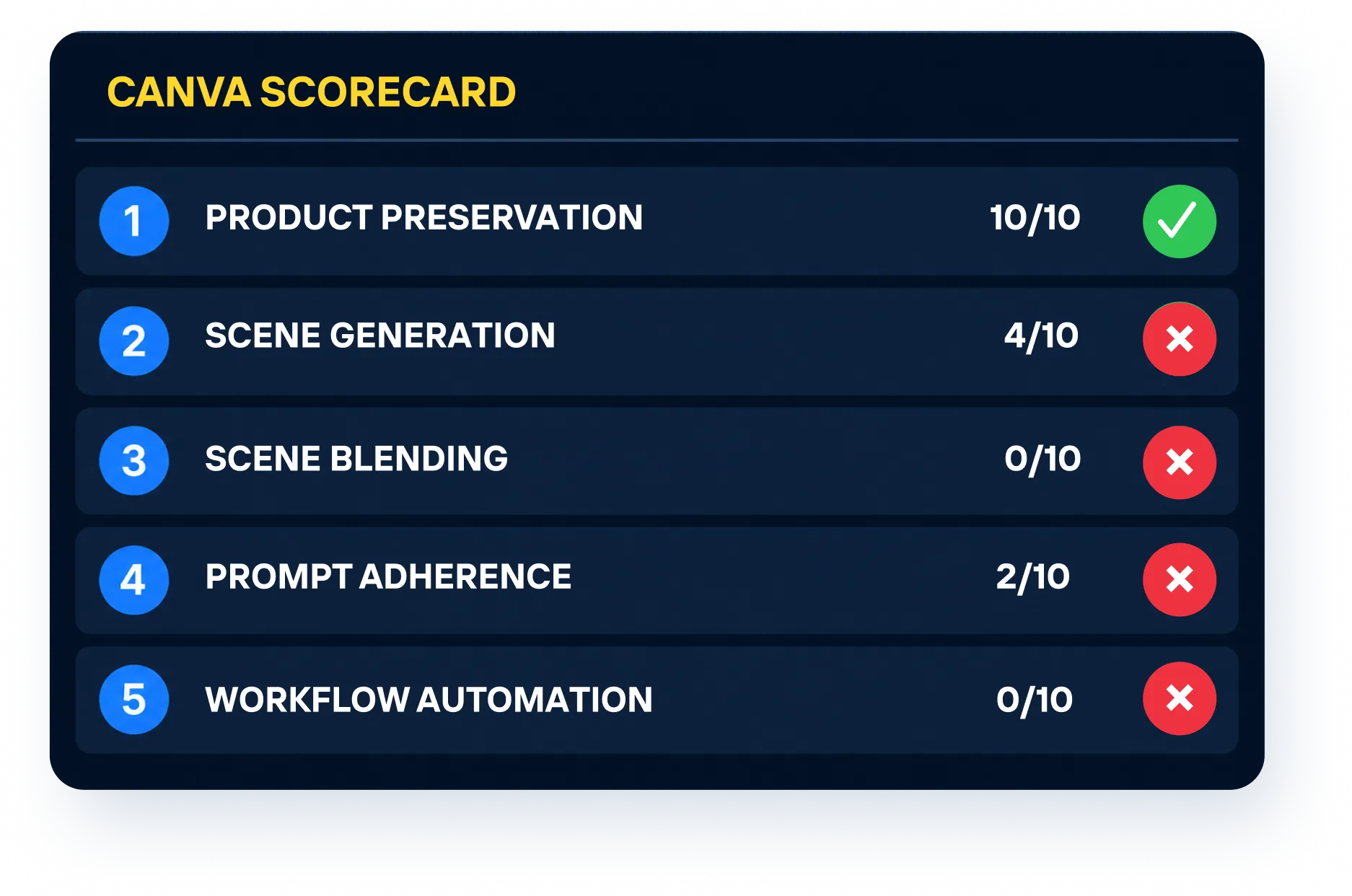
Canva scored 16 out of 50, the lowest result in this particular test.
That does not mean Canva is a weak creative platform. It reflects the fact that we were judging it specifically as an AI product photography production tool.
Canva is built around a much broader design workflow. Product imagery can be one part of a social post, banner, presentation, email or campaign creative.
Our test was narrower.
We wanted to know how well it handled AI product photography for accuracy, scene placement and ecommerce-style consistency.
Handbag Studio Background Test
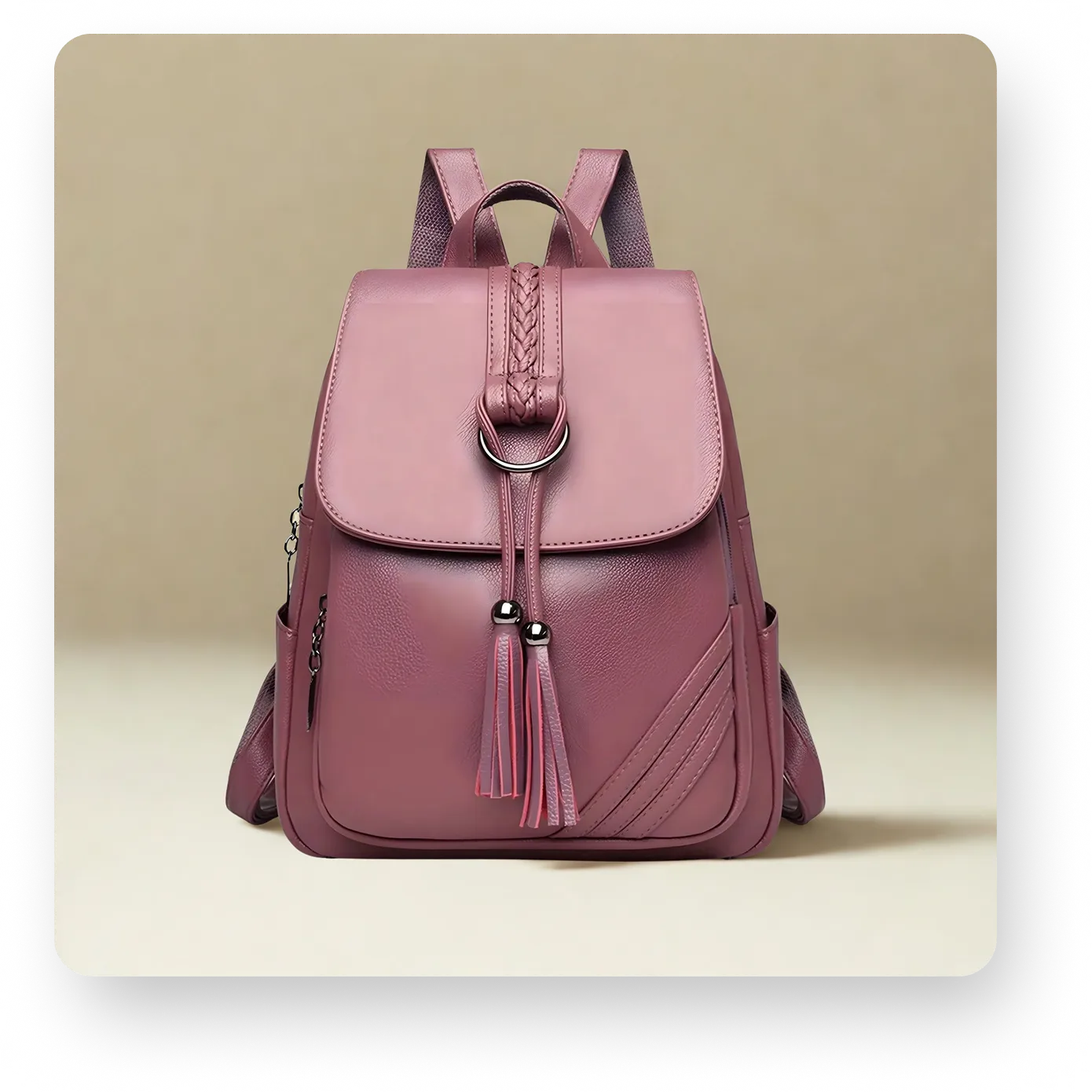
Canva generated several studio-background options, but none matched the controlled beige treatment we specified.
The background color was significantly different from the requested hex value, gradients were noisy, and the shadow was less refined than the target image. Some of the generated options were also not particularly relevant to the prompt.
From an ecommerce perspective, the bigger workflow issue was that Canva worked one image at a time and did not provide a way to set consistent product margins. That makes it harder to align a complete product grid to the same visual standard.
Handbag Lifestyle Scene Test
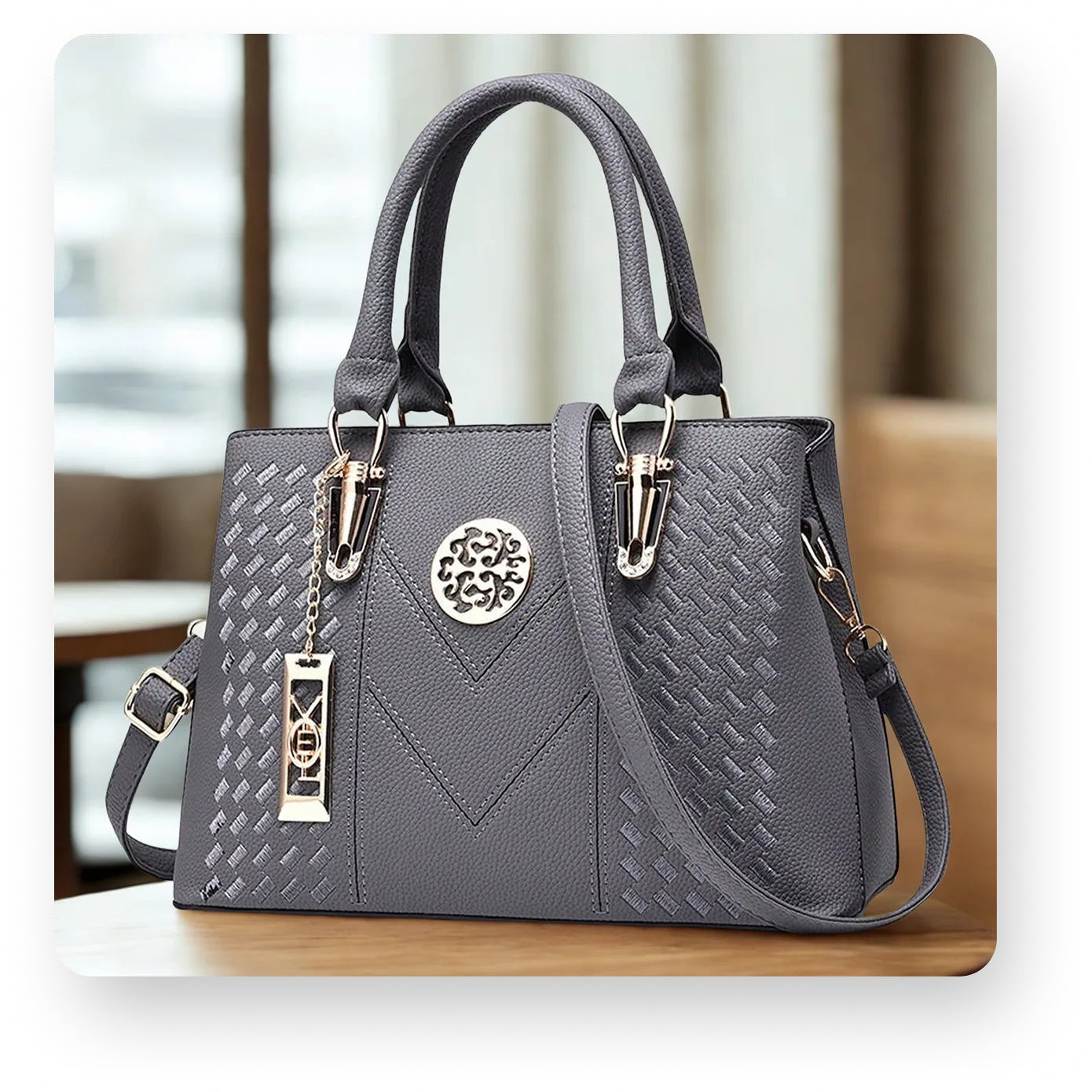
Canva did better on the lifestyle test.
While the interiors looked realistic, they weren’t close to the café setting we specified in the prompt. The lighting also varied between generations, and some options looked noticeably less natural than others.
There was still no precise way to create the breathing room and margins typically required by ecommerce image specifications.
Armchair Room Placement Test
Canva could not perform the room-placement test.
The available background tool allowed us to generate a new background, but there was no option to supply an existing room image and blend the chair into it.
That is an important distinction for furniture ecommerce. If a brand already has an approved room scene, generating a different environment is not the same as placing the product into the existing one.
Lamp Lifestyle Scene with Model Test
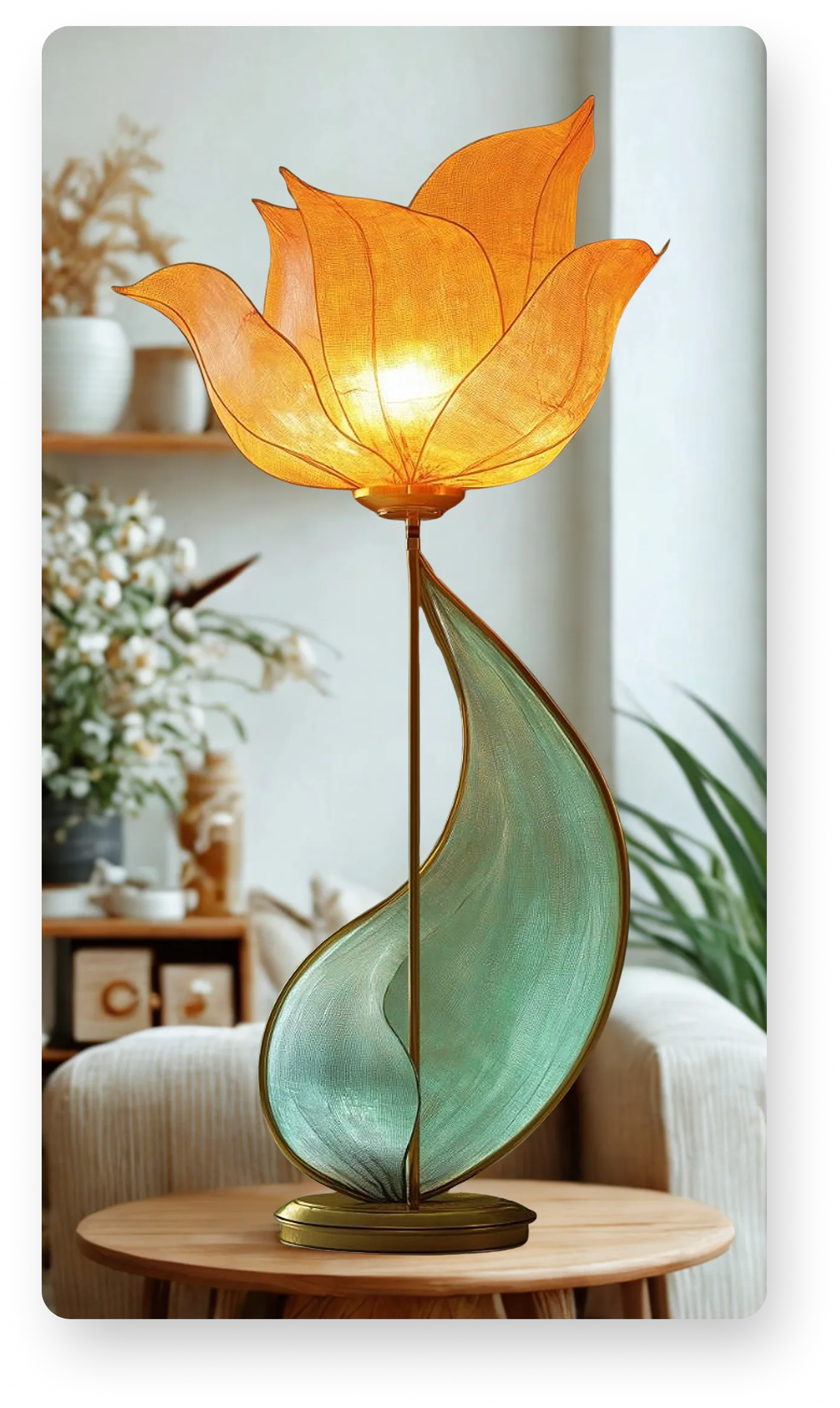
Canva generated a lifestyle environment around the lamp, but the product proportions were significantly off. The lamp appeared much too large in all of the generated options.
It also failed another important part of the prompt: there was no faceless model in the scene.
The image therefore missed both the product-scale requirement and the model requirement. It also needed separate resizing to reach the requested 1:1 output, so the result was not ready for ecommerce use without additional work.
Where Canva fits
Canva’s strength is that the generated image can immediately become part of another design.
For a marketer creating a campaign asset, that integration is useful.
The requirements of a product catalog are different. Ecommerce photography puts much more emphasis on:
- Preserving the exact product
- Maintaining realistic scale
- Keeping backgrounds consistent
- Controlling product placement
- Repeating an approved look across many SKUs
That is the lens we used for the score.
Best for
Marketing and design teams that want AI-generated product imagery inside a broader creative workflow rather than a dedicated catalog-production system.
The Difference Between a Good AI Image and a Good Ecommerce Image
One of the clearest lessons from the test was that visual quality alone is not enough.
A generated image can look realistic and still fail the ecommerce brief.
A handbag may look excellent but have different margins each run. A room may look convincing while the chair is the wrong size. A studio background can look professional but still be the wrong color shade. A lifestyle scene can be attractive while ignoring an important requirement in the prompt.
These details matter because product photography has a functional job: it needs to represent the product accurately while remaining consistent with the rest of the catalog. It is the same problem teams face when standardizing incoming product images from different sources, just applied to generated output instead of supplied files.
That is a higher bar than simply producing an attractive AI image.
What Ecommerce Teams Should Test Before Choosing an AI Product Photography Tool
You do not need dozens of products to evaluate a platform.
A small test set will reveal most of the important differences.
1. Product fidelity
Start with a product that has recognizable details.
Look closely at:
- logos
- stitching
- hardware
- colors
- proportions
- packaging text
- product shape
Compare the generated image directly with the source.
If those details change, the output may look good while still being unsuitable for a PDP.
2. Background control
Do not test only with vague prompts such as “put this in a studio.”
Give the platform a specific direction.
For example:
- exact background style
- brand color
- approved reference image
- existing room
- defined lifestyle environment
Then see how closely the result follows the brief.
3. Scene Blending
If your workflow involves furniture, home goods, or approved brand environments, test whether the platform can place a product into an existing supplied scene.
This is different from generating a new background.
In our test, only Crop.photo and Claid supported this type of room placement. Canva and PhotoRoom could generate backgrounds, but they could not blend the armchair into the room image we supplied.
4. Scale and perspective
Furniture is particularly useful here.
Put a chair, table, or lamp into a room and look at its relationship with the surrounding objects.
Incorrect scale is often one of the fastest ways to spot a generated image that does not feel believable.
5. Lighting and shadows
Look at where the product touches the environment.
Check:
- contact shadows
- light direction
- reflections
- color temperature
- whether the product feels grounded
A good background cannot compensate for a product that looks pasted into the scene.
6. Ecommerce Image Controls
A good generation still has to meet the retailer's image specifications. Resizing without distorting the product is a separate capability from generating the image in the first place, and not every tool has both.
Check whether the tool can control:
- Consistent margins
- Product alignment
- Aspect ratio
- Output dimensions
- Multiple output sizes
Several tools required separate manual steps for these operations. Canva, for example, required resizing after generation and did not provide precise margin control. PhotoRoom treated uniform margins as a separate workflow. Handling output sizes and aspect ratio control inside the same pass is what keeps a generated image from needing a second round of edits before it can be published.
5. Repeatability
This is the test that is often skipped.
Once you get one image you like, try the same setup on 10 more products and place the outputs together in a grid. Do they still look like they belong to the same catalog, or does the background, product scale, or overall treatment start to drift?
That is where the difference between AI image generation and AI product photography at scale becomes much clearer.
Most of the tools we tested are still centered around generating and adjusting images individually. PhotoRoom does support batching and API access, which is useful for higher-volume workflows. Crop.photo takes the automation further by allowing the complete process to be saved as a reusable AI recipe, including the AI generation steps, margins, resizing, and output sizes.
Once that recipe is approved, the same workflow can be applied across multiple products through batch processing, the API, or you can process the same recipe through Shopify, without rebuilding the prompts and settings for every SKU.
For ecommerce teams managing hundreds or thousands of product images, that repeatability can matter just as much as the quality of the first generated image.
Prompting One Image Is Easy. Scaling the Workflow Is Harder.
Prompting is useful during creative exploration.
You can try different backgrounds, environments, and styles until you find the direction you want.
Once that direction has been approved, though, continuing to prompt every image individually becomes inefficient.
For an ecommerce team, the goal should be to turn an approved treatment into a repeatable production rule.
If every handbag requires the same beige studio environment, similar positioning, and the same shadow treatment, those instructions should not have to be rebuilt manually for every SKU.
That is the idea behind reusable AI recipes in Crop.photo.

The creative decision is made once, then the workflow can be reused across additional products.
Which AI Product Photography Tool Should You Choose?
The right tool depends on what you are actually trying to produce.
Choose Crop.photo if your priority is repeatable ecommerce production, especially when the same visual treatment needs to be applied across many products.
Choose Claid if you want flexible AI product staging and are comfortable iterating through prompts and generations.
Choose PhotoRoom if you want a super fast, straightforward product-focused tool for creating individual studio or lifestyle assets quickly.
Choose Canva if product imagery is one component of a broader design workflow and the final asset will immediately be used in ads, social graphics, or other marketing materials.
The important question is not simply which platform creates the best-looking first image.
It is which workflow matches the way your team actually produces ecommerce content.
Our Takeaway
AI product photography is already good enough to remove a significant amount of traditional production work.
But the tools are not interchangeable.
Some are optimized for creating individual images. Others are better suited to creative design workflows. And some are designed around the larger problem of producing consistent ecommerce imagery across a catalog.
Our test made the difference fairly clear.
Crop.photo scored 50/50, followed by Claid at 25/50, PhotoRoom at 22/50, and Canva at 16/50.
Those scores are based on the specific ecommerce tasks we tested, so the ranking should be read in that context.
If your goal is one creative image, your priorities may be different.
If your goal is to produce hundreds or thousands of consistent product images, accuracy, repeatability, and workflow control become much more important.
Turning the same product image into video raises the same questions about product fidelity, scale and repeatability, just with motion added.
Try AI Product Photography on Your Own Products
See how Crop.photo can turn existing product images into studio shots, lifestyle scenes and repeatable ecommerce image workflows.