Introduction
Last year, Mavi opened a US wholesale channel and began supplying product imagery to Bloomingdale’s, Macy’s, and other major retailers. The orders moved fast. The images did not. What started as a growth win quickly turned into an image bottleneck that sat between Mavi and every listing they needed live.

"An absolute game-changer for ecommerce photo editing, multi-channel marketplace imagery and bulk edits! We use this app to manage our product images across multiple marketplace accounts, including Macy’s and Bloomingdale's, which have strict and varying image requirements. It has saved our team an incredible amount of time. The bulk resizing, DPI adjustment, and pose-aware headless cropping features work flawlessly, allowing us to adapt our original PDP assets for different channel specs with just a few clicks. It is incredibly intuitive and easy to use. Beyond the software itself, the customer support team is phenomenal. They are available around the clock and work incredibly fast to implement any custom requirements or tweaks we need. If you handle large catalogs or multi-channel retail, this app is highly recommended!"


The Challenge
3,000 Images a Drop, No Two the Same
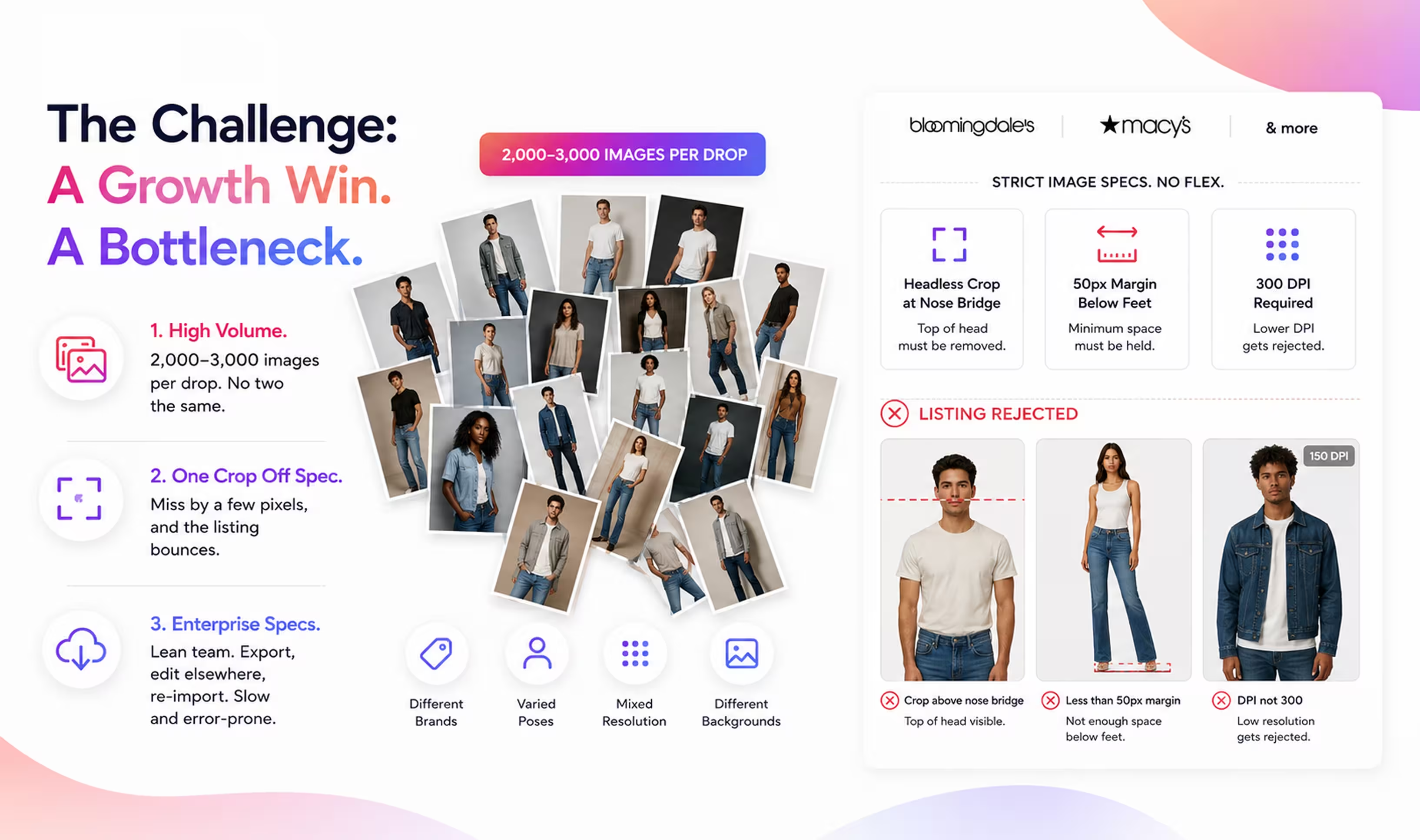
Mavi's dropship team edits on-model and product imagery across several brands. Every drop runs 2,000 to 3,000 images, pulled from different brands and arriving in a mix of poses, framing, resolution, DPI and backgrounds. Each one still had to land on a retailer's shelf looking like it belonged next to everything else.
Impact: The volume and the variety jammed image prep at exactly the wrong moment, slowing sell-in and putting a new US wholesale channel at risk of stalled listings before it could find its footing.
Every retailer enforces its own image resize & crop specs, and they do not bend. For example, Bloomingdale's wants a headless crop with a 50px margin held below the feet, plus a nose-bridge crop that stays identical across every model and product. Hit it and the listing flows. Miss it by a few pixels and it comes back. Generic editors could not hold that precision across thousands of varied shots.
Impact: Off-spec images were rejected at ingest, which stalled listings and dragged the team back into manual rework. Inconsistent crops also broke the clean line of the retailer's product grid — the kind of detail buyers notice and merchandisers reject.
Mavi preps images inside Shopify, which doubles as their PIM. From there, the ecommerce team pulls approved assets into the Mirakl seller platform for Bloomingdale's, Macy's, and other vendors. So every image batch meant export, edit somewhere else, then re-import into Shopify. Existing AI editing tools could not produce enterprise output requirements like 300 DPI. And all of it landed on a small editing team.
Impact: A lean team had no way to absorb a seasonal spike. The export and re-import loop added time and invited errors, and the output gaps put hard-won enterprise approvals on the line.
About Company
Mavi, which means blue in Turkish, began in Istanbul in 1991 with one obsession: a perfectly fitting pair of jeans. More than three decades later it has grown into a global lifestyle brand built on denim, sold across 34 countries through roughly 4,000 points of sale, including 498 Mavi stores, wholesale partners, and online channels. Positioned between the high-end and premium segments, Mavi is known for its Perfect Fit philosophy and a loyal base of 11 million Kartuş members who help bring in around 1.5 million new customers every year. Publicly traded since 2017, Mavi pairs growth with sustainability through its All Blue strategy. In early 2026, TIME and Statista ranked it the world’s 2nd best company for sustainable growth and 1st in the apparel category.

The Solution
Headless Crops, Locked to the Nose Bridge
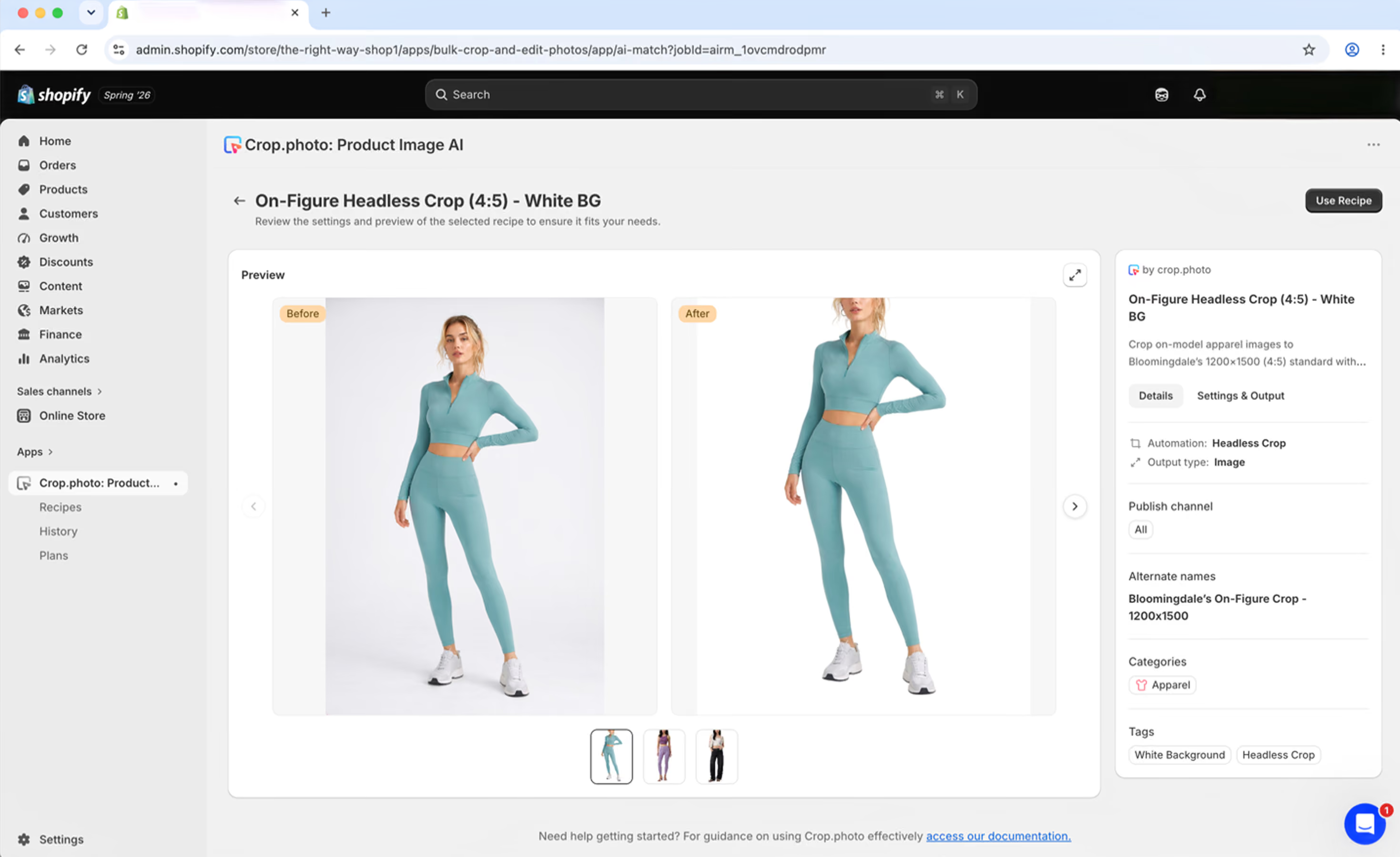
This is Mavi's core win. Crop.photo reads face & body markers and crops each on-model shot above the nose, then holds a steady 20-50px margin below the feet — the exact spec Bloomingdale's and Macy's demand. Because the crop is pose-aware, it stays consistent across models, garments, and product shots, and it keeps Mavi on the right side of model image rights at the same time.
Each marketplace wants a different crop, size, and output. Mavi builds a Crop.photo AI recipe per channel per image spec once, then adapts a single original PDP asset to Macy's, Bloomingdale's, and every other spec in a few clicks. No re-editing the same garment five different ways.
Enterprise retailers ask for output specs that Mavi's previous AI image editing tools simply could not produce. Crop.photo renders at 300 DPI as part of the same recipe, so assets pass marketplace spec checks the first time instead of bouncing back for a separate fix.
A drop is 2,000 to 3,000 images. Crop.photo's Shopify App resizes them to each channel's dimensions in batches, so an entire seasonal drop moves through together rather than one file at a time. The small team stops being the ceiling on output.
Mavi's assets live in Shopify, their PIM. The Crop.photo Shopify App works right there, so the ecommerce team invokes the AI recipes on their Shopify SKUs directly and then pulls spec-ready images straight into Mirakl for Bloomingdale's and Macy's. The export, edit elsewhere, re-import loop is gone — and so is the error that crept in with it.
Retailer rules change and edge cases surface mid-drop. Mavi's team gets 24x7 support around the clock that turns custom spec requirements around fast, so a new requirement from a retailer never becomes the reason a drop slips.
Benefits
With the prep work running on Crop.photo AI recipes, Mavi's image pipeline stopped being the thing that held a drop back. The gains show up in three places.
A full drop of 2,000 to 3,000 images now moves from prep to listing in hours. The new US wholesale channel no longer waits on image work, so product reaches Bloomingdale's, Macy's, and other retailers while it is still in season and still selling.
Pose-aware headless crops and per-channel recipes hold the same nose-bridge crop, 20-50px leg margin, and 300 DPI output across every model, brand, and retailer. That means fewer ingest rejections, far less rework, and a product grid that reads clean on each marketplace.
Automation absorbs the seasonal spike instead of headcount. The same small editing team handles peak drops without overtime or outsourcing, and because the work stays inside Shopify, nothing gets lost in an export and re-import loop.
Results
Per-Drop Turnaround (from 30+ Days)
Images Per Drop, Fully Automated
Brands on One Workflow
Mavi came to Crop.photo with a deadline problem: a new US wholesale channel, thousands of images per drop, and retailer specs that do not forgive a stray pixel. The answer was not more headcount. It was automation that runs where their assets already live.
Today, headless crops, 300 DPI output, and per-channel recipes turn one set of PDP assets into retailer-ready images for Bloomingdale’s, Macy’s, and other major marketplaces — all inside Shopify and ready to push into Mirakl. A lean team now ships full seasonal drops without overtime or outsourcing, listings clear spec the first time, and product reaches the shelf while it is still in season.
Beyond Wholesale: One Workflow Across Every Shopify Store
The marketplace problem was the entry point, not the whole story. Mavi’s team also runs Crop.photo for the DTC sites of the other brands they manage on Shopify, including 34 Heritage. Each brand sits on its own Shopify store, and because Crop.photo works inside Shopify, the same crops, recipes, and output standards carry from store to store without switching tools or rebuilding a workflow for each one. What started as a wholesale fix now runs across every store and every channel — the layer that keeps Mavi’s whole catalog moving.