AI RECIPE
A recipe is a reusable AI workflow that applies consistent edits to all your images in one go, with no prompts required.

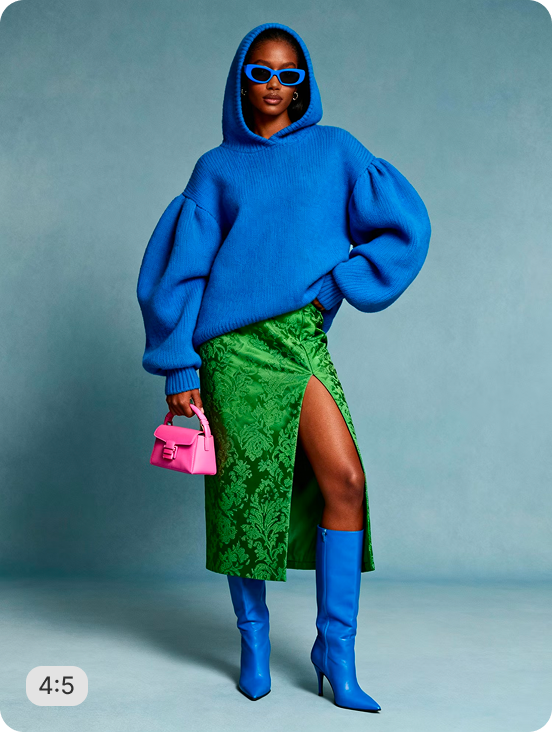
ASOS On-Figure Crop (4:5) - Studio Grey Background

Crop on-model apparel images to ASOS's 2116×2700 (4:5) standard - model centered with 8% padding, AI-generated studio grey background, print-ready 300 DPI JPG output. Batch-process your full catalog with zero manual editing.

About this recipe

This recipe auto-crops on-model apparel photos to ASOS's 2116×2700 (4:5) standard: model centered with 8% padding on all sides, AI-generated studio grey background with generative fill, and output at 300 DPI in JPG - submission-ready in one automated pass. It slots into a multi-retailer workflow alongside our on-figure crop recipes for Zalando, Myntra, and Nordstrom and pairs naturally with our bulk background remover if your originals still carry studio or lifestyle backdrops.

Use cases

  • Meet ASOS's 2116×2700 (4:5) supplier image submission standard at scale
  • Batch-process new apparel collections before an ASOS catalog upload
  • Replace inconsistent studio backgrounds with ASOS's required grey finish
  • Standardize on-model shots across a mixed-format SKU range

Tips for best result

  • Use full-length originals where the model's feet are fully visible for the cleanest 4:5 crop
  • Generative fill is enabled - AI automatically completes any missing background areas around the model
  • 300 DPI output makes every image print-ready and compliant with ASOS's high-quality vendor submission requirements
  • Works on white studio shots, lifestyle images, and any coloured backdrop - the studio grey is AI-generated regardless of input

Try Similar Recipes

Explore other variations for this category
Go to Recipe Gallery

Frequently Asked Questions

Does this recipe meet ASOS's on-figure image requirements?

Yes. The recipe crops to ASOS's 2116×2700 (4:5) standard with an AI-generated studio grey background, model centered with 8% padding on all sides, and 300 DPI JPG output - matching ASOS's published supplier image specification for apparel.

Can I use this recipe if my original images already have a different background?

Yes - the recipe removes any existing background and AI-generates the studio grey backdrop regardless of your input, whether it's a white studio shot, lifestyle image, or photo with a coloured or busy background.

What shade of grey background does this recipe produce?

The recipe uses AI generative fill to produce a studio grey background consistent with ASOS's required aesthetic - the same neutral, even-toned grey seen across ASOS's on-model product listings.

Have more questions or doubts for us? Get your questions answered from out team within 14 hours