AI RECIPE
A recipe is a reusable AI workflow that applies consistent edits to all your images in one go, with no prompts required.

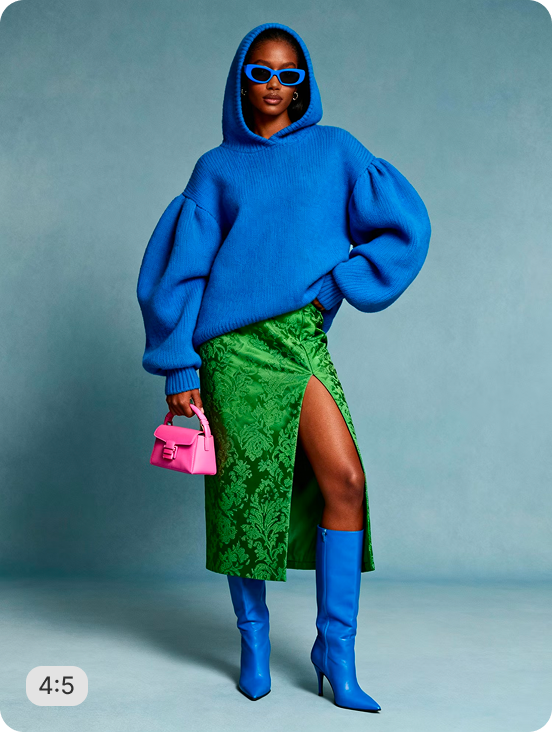
On Model Full Body View - Beige Studio Background

Full-body front-view shots on a studio beige background - garment, pose, lighting, and proportions preserved. Batch-process your apparel catalog and skip the re-shoot.

About this recipe

This recipe is part of Crop.photo's content aware automation. It generates a clean full-body front view of the same model on a studio beige background - preserving garment details, pose, lighting, and proportions exactly as shot. Output size and background color are configurable as per the requirements.

Use cases

  • Standardize on-model apparel shots across your full SKU range
  • Prep fashion catalog images for Marketplaces
  • Replace inconsistent studio backgrounds with a uniform beige finish
  • Batch-process seasonal collections without a new model shoot
  • Generate marketplace-ready full-body views from any on-figure input

Tips for best result

  • Use full-length originals where the model's feet are visible for the cleanest output
  • Works on both straight-on and slight-angle poses - consistent results either way
  • Pair with AI Upscale for sharper detail at large output sizes
  • Configure the output size to match your target marketplace spec (e.g. 1273×2000px at 20:31)
  • Drop your entire seasonal SKU set into a single batch upload for uniform results

Try Similar Recipes

Explore other variations for this category
Go to Recipe Gallery

Frequently Asked Questions

Does this recipe work on any on-model apparel photo?

Yes - upload any full-length on-figure shot and the recipe generates a front-body view on a studio beige background, preserving the garment, pose, lighting, and proportions.

What happens if the model is cropped at the feet in my original image?

The recipe uses generative fill to complete missing areas and deliver a full-body view - best results come from originals where the full figure is visible.

Can I change the background color or output size?

Yes. Both background color and output dimensions are configurable, so you can adapt the recipe to any marketplace or brand standard.

Is this suitable for bulk catalog processing?

Yes - upload hundreds or thousands of on-model images and the recipe processes them in a single batch, returning consistent full-body beige-background images ready for any fashion platform.

Have more questions or doubts for us? Get your questions answered from out team within 14 hours