AI RECIPE
A recipe is a reusable AI workflow that applies consistent edits to all your images in one go, with no prompts required.

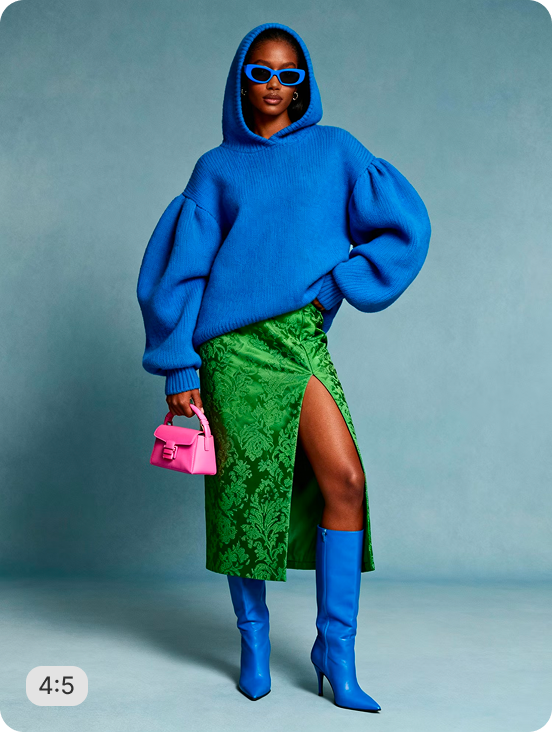
Bag Photography — On-Model Carry Generator

Realistic on-model carry shots — model wearing or holding the bag naturally so customers can see how the strap, scale, and silhouette sit in real use. Try it on your bag catalog without a model session or photoshoot.

About this recipe

Bags need to be seen in use — strap placement, scale, silhouette in motion. This recipe generates realistic on-model carry shots with the model wearing or holding the bag naturally, so customers can see how the bag sits in real use, no model session or photoshoot required.

Use cases

  • Build on-model carry PDPs for bags
  • Show strap fit and bag scale in real use
  • Avoid model sessions for bag campaigns
  • Build editorial bag imagery at scale
  • Produce social media bag content

Tips for best result

  • Use clean studio bag shots for sharpest output
  • Works on totes, handbags, crossbody, backpacks
  • Specify carry style for consistent brand output
  • Batch your full bag range in one upload
  • Pair with Close-Up On-Model for variations

Try Similar Recipes

Explore other variations for this category
Go to Recipe Gallery

Frequently Asked Questions

Will the bag look natural in carry?

Yes — the recipe generates realistic strap placement, hand grip, and body interaction, so the bag looks like it's actually being carried.

Will the bag's hardware and details stay accurate?

Yes. Original bag geometry, hardware, and embellishments are preserved fully — only the model and carry pose are generated around it.

Can I control the carry style?

Yes. Carry style is configurable — over-shoulder, hand-held, crossbody — so you can match the bag's intended use case.

Can it batch process my full bag catalog?

Yes. Upload your entire range and the recipe outputs grid-ready square crops for every bag in one pass.

Have more questions or doubts for us? Get your questions answered from out team within 14 hours