AI RECIPE
A recipe is a reusable AI workflow that applies consistent edits to all your images in one go, with no prompts required.

Apparel Product Photography — Portrait Catalog Crop for Shopify

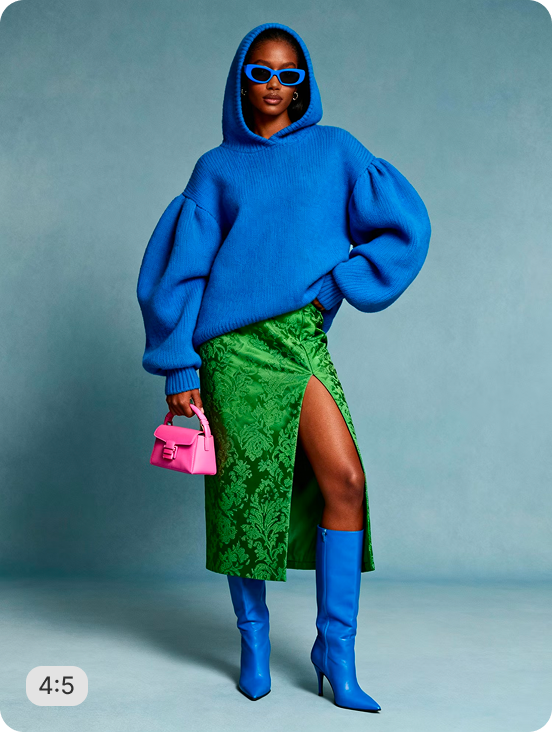
Bulk resize and crop apparel photos into consistent, Shopify-ready images — output as 1280×1600px (4:5 portrait) for Shopify PDPs; scalable to 2048px on the long edge. Batch-process 1000s of SKUs so every product page stays uniform across your store.

About this recipe

Bulk resize and crop your apparel photos into consistent, grid-ready images so every product sits the same way across your Shopify store. This recipe is part of Crop.photo's bulk resize Shopify product images — bulk resize, crop, and standardize every product image across your store — powered by our content-aware image resizer.

Use cases

  • Prep fashion PDP portrait imagery
  • Meet apparel marketplace portrait requirements
  • Build wholesale clothing catalogs in 3:4
  • Build DTC fashion brand product pages
  • Refresh seasonal collections without re-editing

Tips for best result

  • Works on flat lay, ghost mannequin, and on-model
  • Keep input resolution above 1500px
  • Batch your full collection in one upload
  • Consistent lighting yields the cleanest output
  • Pair with AI Upscale to sharpen fabric textures

Try Similar Recipes

Explore other variations for this category
Go to Recipe Gallery

Frequently Asked Questions

Will it work on garments with delicate details?

Yes — edge detection preserves lace, sheer panels, and texture. Use high-resolution originals so fine details remain sharp in the final output.

Does it work on flat lay, ghost mannequin, and on-model shots?

Yes — the recipe handles all three input types and outputs consistent portrait 3:4 imagery on white background, regardless of how the garment was shot.

What is the best image ratio for apparel product photos on Shopify?

Portrait - not square. A survey of top fashion ecommerce brands found the most popular image ratio is 2:3, followed by 4:5, showing brands are intentionally optimising for mobile viewing. On Shopify, 4:5 portrait delivers a more editorial feel while 2:3 provides vertical space for full-length garment views. This recipe outputs at 1280×1600px (4:5) by default, scalable to 2048px on the long edge - the range where Shopify's zoom functionality activates without slowing page load.

Do ASOS, Zalando, and Amazon accept portrait-format apparel images?

Yes, with platform-specific requirements. Zalando requires on-model photography at a minimum 1600px on the shortest side - 2400×3200px recommended - and does not accept flat lay as a primary image. ASOS requires a minimum 2000px width, and non-compliant images delay listing approval by 2–4 weeks. Amazon requires white background at 2000×2000px minimum. This recipe outputs configurable dimensions for each platform from one source upload, so a single batch covers your full multi-channel distribution.

Does it match marketplace portrait requirements?

Yes. Output sizes are configurable to meet Amazon, ASOS, Zalando, and Shopify portrait specifications.

Can it batch process my full apparel collection?

Yes. Upload your entire collection and the recipe delivers consistent 3:4 crops for every garment in one pass — no per-item setup required.

Why do apparel brands use portrait images instead of square on Shopify?

Portrait shows full-length garments - dresses, coats, trousers - without cropping or wasted whitespace that square framing creates. On Shopify DTC stores, on-model and ghost mannequin primary images consistently outperform flat lay on add-to-cart rate for garment categories. Consistent portrait grids increase collection page browse-to-product click rates by 28%. This recipe applies a uniform 4:5 portrait crop to every garment in a batch, so your collection grid delivers that lift without manual per-item editing.

What happens to my Shopify collection page if apparel images have mixed ratios?

The product grid breaks. Mixing portrait and square images produces uneven thumbnails and inconsistent card heights - a visually chaotic experience that reduces browse-to-product click rates. Uniformity matters more than resolution alone - consistency in aspect ratio is the single most impactful image decision for collection page performance. This recipe batch-processes your entire apparel catalog to a uniform 4:5 portrait ratio in one upload, regardless of how inconsistently the originals were shot.

Have more questions or doubts for us? Get your questions answered from out team within 14 hours